
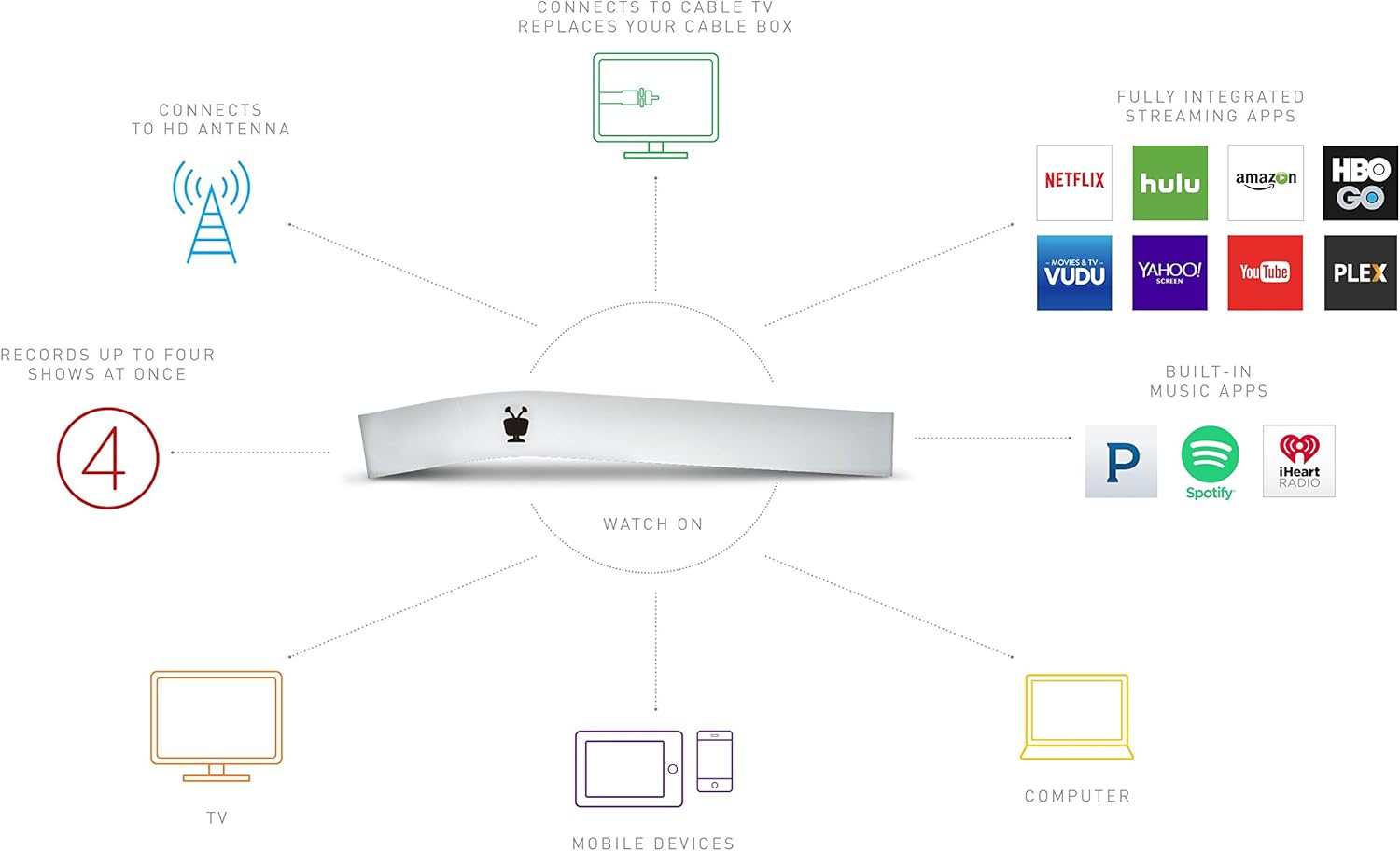
TiVo BOLT 500GB DVR & Streaming Player - 4K UHD Compatible
The TiVo BOLT 500 GB DVR is a digital video recorder and streaming media player that replaces your cable company's equipment, works with your existing digital cable service or HD…
Manual and instructions
Instruction-focused content generated from the current product data and source context.
TiVo BOLT 500 GB DVR User Manual
Table of Contents
- Getting Started
- Setting Up Your TiVo BOLT
- Using Your TiVo BOLT
- Troubleshooting Tips
- Frequently Asked Questions
1. Getting Started
Welcome to your TiVo BOLT 500 GB DVR! This digital video recorder and streaming media player is designed to work with your existing digital cable service or HD antenna, allowing you to record, watch, and stream your favorite content in stunning 4K UHD. In this user manual, you'll find detailed instructions to help you set up and use your TiVo BOLT to its full potential.
2. Setting Up Your TiVo BOLT
- Unpack your TiVo BOLT and included components: BOLT DVR, IR/RF Remote, AC Adapter, HDMI Cable, and Quick Start Guide.
- Connect the TiVo BOLT to your TV using the provided HDMI cable.
- Plug the AC adapter into a power outlet and connect it to your TiVo BOLT.
- Connect your TiVo BOLT to your cable or HD antenna using a coaxial cable (not included).
- For cable users, insert a CableCARD (obtained from your cable provider) into the slot on the back of the TiVo BOLT.
- Connect your TiVo BOLT to your home network using either an Ethernet cable (not included) or Wi-Fi.
- Turn on your TV and TiVo BOLT. Follow the on-screen setup instructions to complete the initial setup process.
- Activate your TiVo service subscription by visiting tivo.com/activate or calling TiVo customer support.
3. Using Your TiVo BOLT
With your TiVo BOLT set up and activated, you can now enjoy its many features:
- Record up to 4 shows simultaneously and store up to 75 hours of HD programming.
- Access your favorite streaming apps, including Netflix, Amazon Prime, HBO GO, Hulu, Pandora, and more, all in one integrated experience.
- Watch 4K/UHD content when available, providing a stunning viewing experience with crisp color, clarity, and detail.
- Use SkipMode to skip through entire commercial breaks of recorded shows at the press of a single button.
- QuickMode allows you to watch recorded shows 30% faster with pitch-corrected audio.
4. Troubleshooting Tips
If you encounter any issues while using your TiVo BOLT, try the following troubleshooting tips:
- Ensure all cables are securely connected to the TiVo BOLT and your TV.
- Double-check that your TiVo service subscription is active.
- Make sure your home network is functioning properly and that the TiVo BOLT is connected to it.
- Restart your TiVo BOLT by unplugging it from the power outlet, waiting 15 seconds, and plugging it back in.
- If you continue to experience issues, contact TiVo customer support for further assistance.
5. Frequently Asked Questions
Q: Can I use the TiVo BOLT with an HD antenna?
A: Yes, the TiVo BOLT is compatible with both digital cable service and HD antennas. Simply connect your HD antenna to the TiVo BOLT using a coaxial cable.
Q: Is a TiVo service subscription required?
A: Yes, a TiVo service subscription is required for the TiVo BOLT. Subscription options include a monthly service plan at $14.99/month with a 1-year commitment or an annual service plan at $149.99/year.
Q: Can I watch 4K/UHD content with the TiVo BOLT?
A: The TiVo BOLT is fully 4K/UHD compatible right out of the box, allowing you to enjoy 4K content when available.
Q: How do I use SkipMode and QuickMode?
A: SkipMode allows you to skip through entire commercial breaks of recorded shows by pressing a single button on your remote. QuickMode lets you watch recorded shows 30% faster with pitch-corrected audio. These features can be accessed using the buttons on your TiVo remote.
Frequently asked questions
Q: Can I add an external hard drive?
A: The TiVo BOLT only works with the 1TB WD DVR Extender. This was confirmed by TiVo service when attempting to connect a 500GB drive removed from another TiVo Premiere, which did not work. Multiple TiVo's on the same network can play back recordings from any TiVo, just like the Mini does. This works great with one DVR on cable and one DVR on antenna even though the DVR's are on separate subscriptions. The other option is replacing the internal 500GB drive with up to a 3TB drive.
Q: Can I save recordings to another drive?
A: You can buy a Western Digital 1TB My Book AV DVR Expander (hard drive) model WDBABT0010HBK-NESN and connect it to all TiVos of Series 3 or higher through their eSata port using the eSata wire. The TiVo DVR will then share recording space both internally and externally; you cannot move shows externally for transport elsewhere via the external DVR expander itself. Western Digital DVR expanders are the only external expanders that work on TiVos.
Q: Can you hook up the BOLT to your home wifi and stream it to other TVs? Or do you essentially need one BOLT per TV?
A: Not if you want to stream wirelessly to other TVs. You must use an Ethernet connection MoCA for streaming to other TVs. (This explains what MoCA is and how it works: https://www.tivo.com/support/how-to/what-moca)
Q: Tivo has no record of the unit being registered?
A: Go here and change the registration from Amazon to you. https://support.tivo.com/SupportPortalArticleViewPage?artURL=/articles/Features_Use/Register-Your-Pre-Activated-TiVo-Roamio-OTA-from-Amazon
Q: Can you download recordings to an iPad or Android tablet using the TiVo app? The app comments indicate you need the Pro/Plus version.
A: I cannot speak for iPhone or iPad, as I have an Android phone. The TiVo app on my phone says that I need to set up a streaming device. I am assuming that it means this device. I do not own one of these yet, but I have been thinking about getting one for my bedroom. In theory, I should be able to watch recorded shows then.
Q: We have lifetime service on our older model TiVo. Will that just transfer over if we purchase this new model?
A: No. Most people do not realize that a TiVo is very expensive to make just like an iPhone is. The retail price of a TiVo is around $600 or $700. Because most people cannot afford to buy one at that cost, they cut the purchase price of the machine to less than half and make up the difference in the service fee. All-in is the way to go if you can afford it because you are only paying the retail balance for that price and not extra. If you could transfer the all-in to another device, then TiVo would be losing a lot of money because they would be giving out a $700 device at $300. Think of it like a cell phone; whenever you get a new phone, you have to sign a new contract.
Q: How many recordings can you do at once, and does it require the $14 a month subscription?
A: The BOLT comes with lifetime service, so there are no monthly fees. It has four tuners for a possibility of four shows. It is also recording the live channel at all times and depending on overlap limited me to two shows once.
Q: Does it have HDMI inputs for other devices (aka Roku)? I know I can't record, but it would be nice to be able to view these devices through the TiVo.
A: The BOLT does not have HDMI inputs for other devices. In not sure what you use your Roku or Fire TV stick to watch, but the BOLT already streams Hulu, Amazon, YouTube, Yahoo and some others through its interface.
Q: Is streaming for services like Netflix, etc., done wirelessly, a la Roku? Or is streaming only achieved via a hardwire Ethernet connection?
A: The BOLT has a built-in wireless adapter for streaming Netflix, Amazon, etc., and to update the program guide. They also now support PLEX which is a great app for viewing your library of movies stored on your PC, which also works over the built-in wireless adapter but you will get better performance using the built-in Ethernet wired connection for streaming full HD video using PLEX.
Q: I've never had a TiVo before. What is the purpose of the subscription? Is it required and what do I get with it?
A: The TiVo service subscription is required. Options include a monthly service plan at $14.99/mo and a 1-year commitment and an annual service plan at $149.99/year. It provides access to program guide data and software updates, as well as features such as SkipMode and QuickMode. Your favorite streaming apps are fully integrated: No more switching inputs, remotes or devices. Access Netflix, Amazon Prime, HBO GO, Hulu, Pandora and more from one integrated experience.
Specifications
Structured product details pulled from the latest available product data.
| Brand | TiVo |
|---|---|
| Manufacturer | TiVo |
| Model Number | R84950 |
| Category | Electronics > Television & Video > Streaming Media Players |
| Color | White |
| Weight | 11.2 ounces |
| Media Type | Digital |
| Special Feature | Compact |
| Resolution | 3840x2160 |
| Connector Type | Wi-Fi |
| Connectivity Technology | Wi-Fi |
| Model Name | BOLT |
| Item Weight | 11.2 ounces |
| Audio Output Mode | 5.1 Surround Sound |
| Other Special Features of the Product | Compact |
| Supported Audio Format | AAC |
| Surround Sound Channel Configuration | 5.1 Surround Sound |
| Total Number of HDMI Ports | 1 |
| Compatible Devices | Cable or Antenna |
| Analog Video Format | NTSC |
| Number of Channels | 1 |
| Video Output Resolution | 3840x2160 or 4K/UHD |
| Controller Type | Button Control |
| File Format | MP4 |
| Built-In Media | BOLT DVR^IR/RF Remote^AC Adapter^HDMI Cable^Quick Start Guide |
| UPC | 851342000445 |
| Number of Items | 1 |
| Global Trade Identification Number | 00851342000445 |
| Mfr Part Number | R84950 |
| Warranty Description | 90 days parts and labor, 1 year parts only |
| Best Sellers Rank | #83,956 in Electronics (See Top 100 in Electronics) #345 in Streaming Media Players |
| ASIN | B01DR4T754 |
| Customer Reviews | 3.6 3.6 out of 5 stars (546) 3.6 out of 5 stars |
| Item Dimensions L x W x H | 8"L x 2.7"W x 4.3"H |
| GTIN | 851342000445 |
Use this page carefully
ProductReviewGPT pages are AI-assisted summaries. When a source document is available, it should take priority over the generated summary for important operating, warranty, safety, or compliance details.