
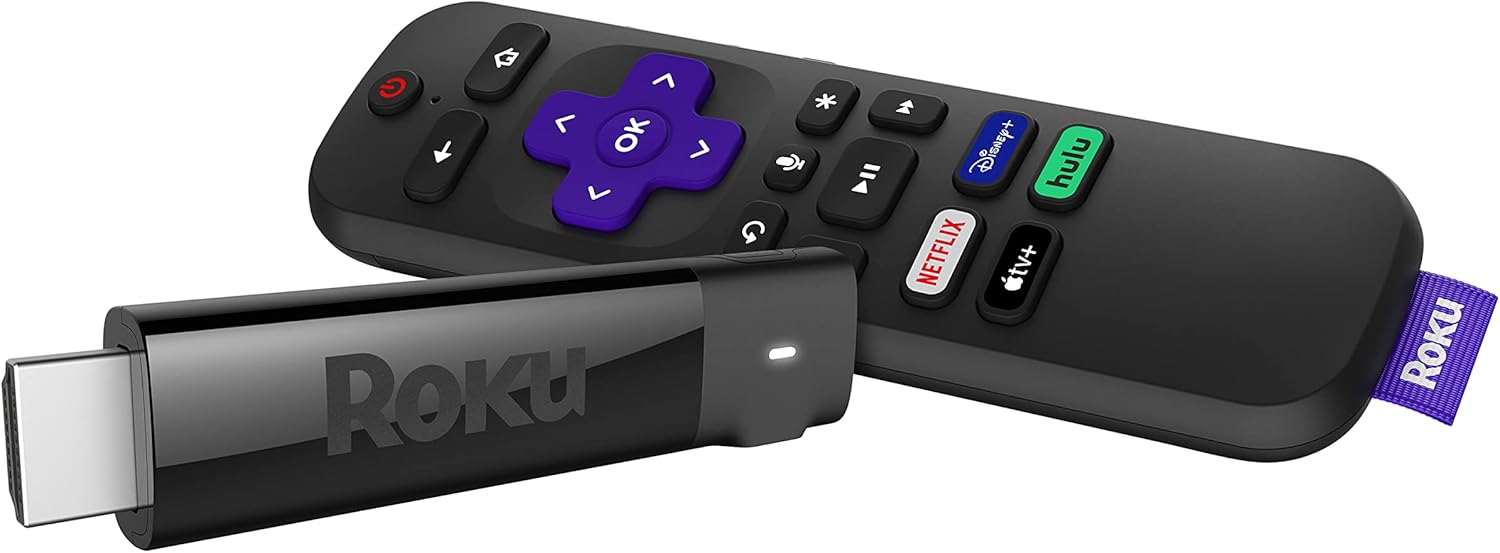
Roku Streaming Stick+ - High-Quality HD/4K/HDR Streaming Device
The Roku Streaming Stick+ is a powerful and portable streaming device that allows you to enjoy your favorite shows and movies in HD, 4K, and HDR. With its long-range wireless rece…
Manual and instructions
Instruction-focused content generated from the current product data and source context.
User Manual: Roku Streaming Stick+
Getting Started
What's in the Box
- Roku Streaming Stick+
- Roku Voice Remote with TV controls
- 2 AAA batteries
- Power adapter and USB power cable with long-range wireless receiver
Setting Up Your Roku Streaming Stick+
Step 1: Connect to Your TV
Plug the Roku Streaming Stick+ into an available HDMI port on your TV. If you have a 4K TV and want to get the best experience, make sure your TV also supports 60fps.
Step 2: Power Up
Connect the included USB power cable to the Roku Streaming Stick+ and the other end to either your TV (if it has a USB port) or the included power adapter, which can be plugged into a wall outlet.
Step 3: Connect to the Internet
Follow the on-screen prompts to connect your Roku Streaming Stick+ to your Wi-Fi network. If your router is far away, don't worry—the long-range wireless receiver should give you a strong signal.
Step 4: Create a Roku Account and Activate Your Roku Streaming Stick+
Follow the on-screen prompts to create a Roku account (or log in if you already have one) and activate your Roku Streaming Stick+. There is no activation fee.
Using Your Roku Streaming Stick+
Streaming Content
You can stream content from thousands of free and subscription channels, including popular ones like Netflix, Prime Video, and The Roku Channel. You can also stream live sports and local news.
Using the Roku Voice Remote
With the Roku Voice Remote, you can power up your TV, adjust the volume, mute, and control your streaming. You can also use your voice to quickly search across channels or turn on captions.
Private Listening
With the free Roku mobile app, you can listen privately by turning up the volume on your shows without disturbing the house.
Troubleshooting Tips
If you're experiencing issues with your Roku Streaming Stick+, here are some tips that might help:
- If you're having trouble connecting to your Wi-Fi network, try moving your Roku Streaming Stick+ closer to your router. The long-range wireless receiver should give you a strong signal, but distance and obstacles can still affect Wi-Fi performance.
- If you're not seeing video in 4K quality, make sure your TV supports 4K at 60fps and that you're streaming 4K content.
- If you're having trouble with the voice controls, make sure your Roku Voice Remote is properly paired with your Roku Streaming Stick+ and that it's not muted.
Frequently Asked Questions
Do I have to pay an activation fee?
No, Roku players do not require an activation fee, registration fee, equipment rental fee, service fee, or any charge for support of any kind.
Can I use this to stream on different TVs?
Yes, the Roku Streaming Stick+ is a portable streaming device that you can take anywhere. It works with any TV with an HDMI connection.
Can Roku Streaming Stick+ stream 4K at 60 frames per second?
Yes, but to get the best experience you’ll need a TV that also supports 60fps. Remember, 4K requires compatible 4K TV & content.
Will Roku Streaming Stick+ work with Siri, Alexa, or Hey Google?
Yes, you can control your Roku Streaming Stick+ using Siri, Alexa, or Google Assistant. You can also control your device using the Apple Home app on your Apple devices.
What kind of channels can I watch?
Roku offers thousands of free and subscription channels that allow you to watch just about anything. From popular channels like Netflix and Prime Video to The Roku Channel packed with exclusive free entertainment, and even live sports and local news.
Frequently asked questions
Q: Do I have to pay an activation fee for the Roku Streaming Stick+?
A: No, there is no activation fee or any other charges for using Roku players.
Q: Can I use this streaming stick on different TVs?
A: Yes, the Roku Streaming Stick+ is designed to be portable and can be connected to any TV with an HDMI connection, whether it's in your living room, bedroom, or even a hotel room.
Q: What kind of channels can I watch on the Roku Streaming Stick+?
A: You can access thousands of free and subscription channels on Roku, including popular ones like Netflix and Prime Video. You can also enjoy exclusive free entertainment on The Roku Channel, as well as live sports and local news.
Q: Can the Roku Streaming Stick+ stream 4K at 60 frames per second?
A: Yes, the Roku Streaming Stick+ supports 4K streaming at 60fps. However, you will need a compatible 4K TV and content to fully experience it.
Q: Does the Roku Streaming Stick+ work with voice assistants like Siri, Alexa, or Hey Google?
A: Yes, you can use voice commands with your Alexa or Google Assistant-enabled devices to launch channels, search for entertainment, and control your streaming. You can also control the device using the Apple Home app or Siri on your Apple devices.
Q: How is the Roku Streaming Stick+ powered?
A: The streaming stick can be powered by either plugging the USB power cable into the USB port on your TV or a wall outlet. A USB power extender cable may be required for wall outlet connection.
Q: Will the remote work if the stick is behind the TV?
A: Yes, the remote works over WiFi so line of sight is not needed. It should work fine even if the stick is behind the TV. However, if it's too close to the HDMI connector on the TV, the signal may be corrupted. In such cases, Roku provides an extension to move the stick away from the HDMI connector.
Q: Is this the Roku Streaming Stick+ model number 3810?
A: Yes, this is the Roku Streaming Stick+ model number 3810.
Q: How long is the provided power cable for the Roku Streaming Stick+?
A: The provided power cable is 48 inches long.
Q: Can I download the Spectrum app to access my Spectrum account channels?
A: As of December 13, 2020, the Spectrum TV app is no longer available on Roku due to a dispute between Spectrum and Roku.
Q: Can I download the Xfinity app on the Roku Streaming Stick+?
A: The Xfinity app is not available on Roku devices. However, you can use the "Xfinity Stream" application on your iPhone and cast it to your TV using Chromecast or AirPlay.
Q: Does the Roku Streaming Stick+ work with YouTube TV?
A: Yes, YouTube TV has a Roku app that can be used to stream content. However, compatibility may vary depending on the specific Roku device.
Q: Is there a monthly charge for using the Roku Streaming Stick+?
A: There is no monthly charge for using the Roku Streaming Stick+. Once you purchase the device, there are no additional fees for activation or ownership.
Q: Can I watch networks like Bravo and ESPN through live streaming on Roku?
A: Live streaming is available on most channels, but specific channels like Bravo and ESPN may not be available on certain streaming services. It depends on the availability of these channels on the streaming service you choose.
Q: Is it advisable to turn off the Roku stick when not in use?
A: You can choose to turn off the Roku stick by either plugging it into a wall outlet or turning off your TV. If you plug it into a wall outlet, the stick will stay in sleep mode. If you turn off your TV, both the stick and TV will turn off completely. The choice depends on personal preference and whether you want to conserve power or have faster startup times.
Specifications
Structured product details pulled from the latest available product data.
| Brand | Roku |
|---|---|
| Model Number | 3810R |
| Category | Electronics > Television & Video > Streaming Media Players |
| Color | Model |
| Weight | 9 ounces |
| Dimensions | 3.7 x 0.8 x 0.47 inches |
| First Available | October 2, 2017 |
| Brand Name | Roku |
| Item Weight | 9 ounces |
| Product Dimensions | 3.7 x 0.8 x 0.47 inches |
| Item model number | 3810R |
| Batteries | 2 AAA batteries required. (included) |
| Is Discontinued By Manufacturer | No |
| Color Name | Model |
| Number of Component Outputs | hdmi |
| Special Features | Wireless |
| ASIN | B075XLWML4 |
| Customer Reviews | 4.7 4.7 out of 5 stars 126,371 ratings 4.7 out of 5 stars |
| Best Sellers Rank | #4,281 in Electronics (See Top 100 in Electronics) #36 in Streaming Media Players |
| Date First Available | October 2, 2017 |
| Brand | Roku |
| Connectivity Technology | Wi-Fi |
| Connector Type | Mini DIN |
| Special Feature | Wireless |
| Resolution | 4k |
| Supported Internet Services | Netflix, Prime Video, HBO, Hulu with Live TV, Apple TV, The Roku Channel, Showtime and Google Play |
| Controller Type | Remote Control, Voice Control |
| Color | Model |
| Model Name | 3810R |
| Item Weight | 0.56 Pounds |
Use this page carefully
ProductReviewGPT pages are AI-assisted summaries. When a source document is available, it should take priority over the generated summary for important operating, warranty, safety, or compliance details.