
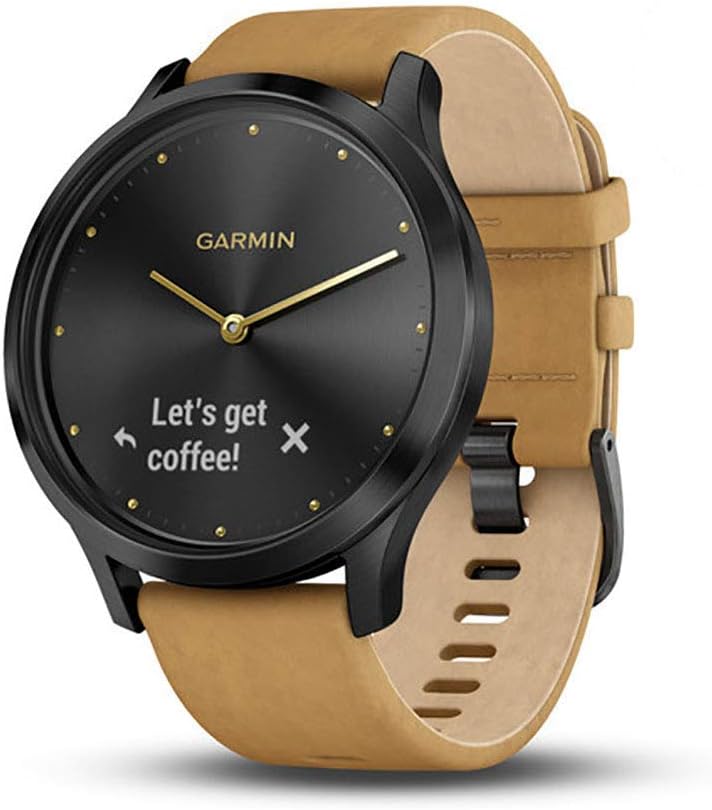
Garmin Vivomove HR Hybrid Smartwatch - Onyx Black/Suede.
The Garmin vivomove HR is a hybrid smartwatch that combines the classic look of a traditional watch with the advanced features of a modern fitness tracker. Featuring a sleek onyx…
Manual and instructions
Instruction-focused content generated from the current product data and source context.
Garmin vívomove HR Hybrid Smartwatch User Manual
Table of Contents
- Getting Started
- Charging the Device
- Pairing with a Smartphone
- Using the Touchscreen and Watch Hands
- Tracking Activities and Wellness
- Smart Notifications
- Customizing Your Device
- Troubleshooting Tips
- Frequently Asked Questions
1. Getting Started
To begin using your Garmin vívomove HR Hybrid Smartwatch, follow these steps:
- Remove the device from its packaging.
- Charge the device using the included charging/data cable (see section 2 for charging instructions).
- Download and install the Garmin Connect Mobile app on your compatible smartphone.
- Pair your vívomove HR with your smartphone (see section 3 for pairing instructions).
2. Charging the Device
To charge your vívomove HR, follow these steps:
- Connect the included charging/data cable to a USB power source or computer.
- Align the charging pins on the back of the device with the connectors on the charging cable.
- Attach the cable to the device, ensuring a secure connection.
- Charge the device for at least 1-2 hours or until fully charged.
3. Pairing with a Smartphone
To pair your vívomove HR with your smartphone, follow these steps:
- Ensure your smartphone has Bluetooth enabled and is within 10 meters (33 feet) of the device.
- Open the Garmin Connect Mobile app on your smartphone.
- Follow the on-screen instructions to create a Garmin Connect account or sign in to your existing account.
- Select your vívomove HR from the list of available devices and confirm the pairing.
4. Using the Touchscreen and Watch Hands
The vívomove HR features a touchscreen and watch hands that dynamically move out of the way when you interact with the touchscreen. To use the touchscreen, quickly turn your wrist to glance at your watch. The smart display will appear, and you can swipe left or right to view different data screens. To interact with the touchscreen, you can use the following gestures:
- Touch left
- Touch center
- Touch right
- Swipe left
- Swipe right
- Hold
5. Tracking Activities and Wellness
Your vívomove HR tracks various activities and wellness metrics, including:
- Steps
- Calories burned
- Distance traveled
- Heart rate and intensity minutes
- All-day stress tracking
- Advanced sleep monitoring with REM sleep
- Fitness monitoring tools such as VO2 max and fitness age
6. Smart Notifications
When paired with a compatible smartphone, your vívomove HR can display smart notifications for incoming calls, text messages, calendar reminders, and more. To view notifications, swipe left or right on the touchscreen until you reach the notifications screen. You can also control music playback on your smartphone using the device.
7. Customizing Your Device
You can customize your vívomove HR by changing the watch face, adjusting settings, and more using the Garmin Connect Mobile app. To customize your device, open the Garmin Connect app, select your device from the main menu, and explore the available options.
8. Troubleshooting Tips
If you encounter issues with your vívomove HR, try the following troubleshooting tips:
- Ensure the device is charged and powered on.
- Check that your smartphone's Bluetooth is enabled and within range of the device.
- Restart both your vívomove HR and your smartphone.
- Update the device's firmware and the Garmin Connect Mobile app to the latest version.
- If all else fails, perform a factory reset on the device (note that this will erase all user data).
9. Frequently Asked Questions
Q: Can I change the bands on my vívomove HR?
A: Yes, the vívomove HR uses industry-standard 20mm quick-release accessory bands, allowing you to easily change the look of your device.
Q: Is the vívomove HR waterproof?
A: The vívomove HR has a water rating of SWIM, making it suitable for swimming and showering but not for high-speed water sports or diving.
Q: Can I reply to text messages or decline phone calls from the device?
A: The vívomove HR does not support replying to text messages or declining phone calls directly from the device.
Q: Can I use the vívomove HR without a smartphone?
A: While the vívomove HR can function as a standalone watch, many of its features, such as smart notifications and activity syncing, require a connection to a compatible smartphone.
Frequently asked questions
Q: Can this watch be worn while swimming?
A: Yes, it is rated 5 ATM and can be worn while swimming.
Q: What notifications can you receive and can you respond to them?
A: You can receive any notification that you have set up on your phone, but you cannot respond to text messages.
Q: Is there Whatsapp message display and reply functionality?
A: Whatsapp should display without a problem, but there is no reply functionality.
Q: What is the difference between the sport version and the premium version of the Vivomove HR?
A: The sport version has a case material of fiber-reinforced polymer, a weight of 40.8 g, a strap material of silicone, and an MSRP of $199.99. The premium version has a stainless steel case material, a weight of 56.5 g, a leather strap material, and an MSRP of $299.99.
Q: What are the face sizes for the large and the med/small?
A: The size refers to the size of the wristband, not the face.
Q: Can Bluetooth be turned off?
A: Yes, Bluetooth can be turned off by following the instructions in the manual.
Q: What is Elevate wrist heart rate technology?
A: It measures heart rate every second and provides accurate readings. Heart rate can be monitored anytime and is recorded on your phone.
Q: Can the "clear display" to 10:10 position for bottom reading feature be disabled?
A: It is unclear if this feature can be disabled.
Q: How close does your phone have to be to receive notifications?
A: The range may depend on the phone, but it disconnects beyond 50 feet for some users.
Q: What is the difference between premium and sport?
A: The premium version has a metal body and leather band while the sport version has a plastic body and rubber band.
Overall, the Garmin vivomove HR is a stylish hybrid smartwatch that features a touchscreen and precision watch hands. It offers 24/7 heart rate monitoring, fitness and wellness monitoring tools, and smart features such as music controls and smart notifications. The battery life is up to 5 days in smart mode and up to 2 additional weeks in watch mode. While it has some industry-wide flaws, it is considered one of the best products on the market.
Specifications
Structured product details pulled from the latest available product data.
| Brand | Garmin |
|---|---|
| Manufacturer | Garmin |
| Model Number | 010-01850-10 |
| Color | Onyx Black w/ Suede |
| Material | Suede |
| Weight | 1.76 ounces |
| Dimensions | 1.7 x 1.7 x 0.5 inches |
| First Available | August 30, 2018 |
| Product Dimensions | 1.7 x 1.7 x 0.5 inches |
| Item Weight | 1.76 ounces |
| Domestic Shipping | Item can be shipped within U.S. |
| International Shipping | This item can be shipped to select countries outside of the U.S. Learn More |
| ASIN | B07GM599TL |
| Item model number | 010-01850-10 |
| Batteries | 1 Lithium Ion batteries required. |
| Customer Reviews | 4.4 out of 5 stars 4,060 ratings 4.4 out of 5 stars |
| Best Sellers Rank | #88,180 in Electronics |
| Is Discontinued By Manufacturer | No |
| Wireless communication technologies | Bluetooth |
| Connectivity technologies | Bluetooth |
| Special Features | Time Display, Sleep Monitor, Calendaring, Text Messaging, Pedometer, Notifications, Heart Rate Monitor |
| Other display features | Wireless |
| Device interface - primary | Touchscreen |
| Scanner Resolution | 64 x 128 pixels |
| Colour | Onyx Black w/ Suede |
| Included Components | Vivomove HR, Documentation, Charging/data cable, Black silicone band |
| Department | Unisex-adult |
| Country of Origin | Taiwan |
| Date First Available | August 30, 2018 |
| Special Feature | Time Display, Sleep Monitor, Calendaring, Text Messaging, Pedometer, Notifications, Heart Rate Monitor See more |
| Compatible Devices | Smartphone |
| Screen Size | 0.85 Inches |
| Age Range (Description) | Adult |
| Style | Premium |
| Connectivity Technology | Bluetooth |
| Shape | Round |
| Band Material Type | Suede |
Use this page carefully
ProductReviewGPT pages are AI-assisted summaries. When a source document is available, it should take priority over the generated summary for important operating, warranty, safety, or compliance details.