
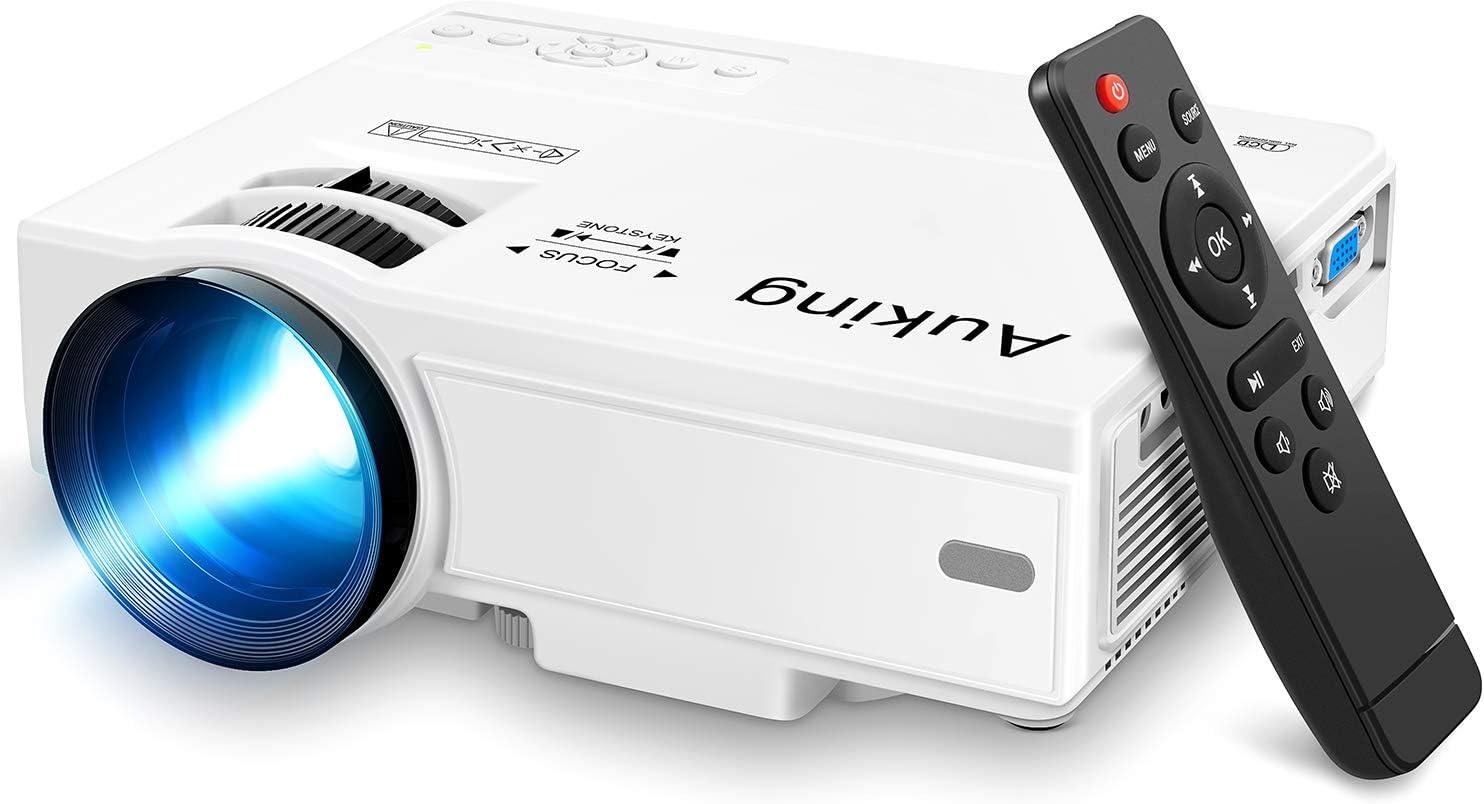
AuKing Mini Projector - Portable Home Theater Projector
The AuKing Mini Projector 2021 Upgraded Portable Video-Projector is the perfect choice for anyone looking for a high-quality home theater experience. With its 2000:1 contrast rati…
Manual and instructions
Instruction-focused content generated from the current product data and source context.
AuKing Mini Projector 2021 Upgraded User Manual
Table of Contents
- Package Contents
- Product Overview
- Setting Up the Projector
- Connecting Devices
- Adjusting the Projection
- Troubleshooting Tips
- Frequently Asked Questions
1. Package Contents
- AuKing Mini Projector
- Remote Control
- Power Cable
- AV Cable
- User Manual
2. Product Overview
The AuKing Mini Projector is a portable multimedia home theater projector with a 2000:1 contrast ratio, 1080p resolution support, and 55,000 hours of LED lamp life. It provides a superior viewing experience with a projection display size of 32" to 170" and built-in stereo speakers.
3. Setting Up the Projector
- Place the projector on a stable, flat surface or mount it on a tripod.
- Connect the power cable to the projector and plug it into an electrical outlet.
- Turn on the projector by pressing the power button on the projector or the remote control.
4. Connecting Devices
The AuKing Mini Projector is compatible with various devices such as laptops, smartphones, tablets, USB drives, and gaming consoles. Follow the instructions below to connect your device:
Connecting with HDMI
- Connect your device (TV Stick, Laptop, DVD, PS3, Xbox, TV box) to the projector using an HDMI cable.
- For smartphones, use a Lightning to HDMI adapter (for iPhones) or a Micro USB/Type C to HDMI adapter (for Android phones) - not included.
- Select the HDMI input source on the projector using the remote control or the buttons on the projector.
Connecting with VGA
- Connect your PC to the projector using a VGA cable.
- Select the VGA input source on the projector using the remote control or the buttons on the projector.
Connecting with AV
- Connect your TV/video device to the projector using the included AV cable.
- Select the AV input source on the projector using the remote control or the buttons on the projector.
5. Adjusting the Projection
- Adjust the projection distance between 1m and 5m to achieve the desired display size (32" to 170").
- Rotate the focus wheel on the projector to adjust the image sharpness.
- Adjust the keystone correction on the projector to correct any image distortion and make the image rectangular.
- Use the adjustable foot pad to level the projector and ensure a stable projection.
6. Troubleshooting Tips
- If the image is blurry, adjust the focus wheel and ensure the projector is at the correct distance from the screen.
- If the image is distorted, adjust the keystone correction to correct the image shape.
- If there is no sound, check the volume settings on the projector and your connected device. Ensure the audio source is correctly selected and try connecting external speakers if necessary.
- If the projector is not turning on, check the power cable connection and ensure it is plugged into a working electrical outlet.
7. Frequently Asked Questions
Q: Can I use this projector for business presentations or PPT?
A: The AuKing Mini Projector is primarily designed for home theater use and is not recommended for business presentations or PPT.
Q: Can I watch Netflix and Hulu on this projector?
A: Due to copyright issues, projectors with screen mirroring capabilities are not compatible with Netflix and Hulu.
Q: What is the warranty on this projector?
A: The AuKing Mini Projector comes with a 2-year warranty. If you have any issues while using the projector, please feel free to contact the customer support team.
Q: How do I connect my smartphone to the projector?
A: To connect your smartphone, you will need an additional Lightning to HDMI adapter for iPhones or a Micro USB/Type C to HDMI adapter for Android phones (not included).
Frequently asked questions
Product FAQ:
Q: What is the resolution of the AuKing Mini Projector?
A: The native resolution of this projector is 800x480, but it supports 1080p resolution.
Q: What is the lamp life of the projector?
A: The lamp life is 55,000 hours, which means that the lamp can be used for more than 15 years and used for 5 hours a day.
Q: What is the projection display size of the projector?
A: The projection display size varies from 32'' to 170'' with a projection distance between 1m and 5m.
Q: Can I connect my laptop or smartphone to this projector?
A: Yes, you can connect your laptop, smartphone, TV stick, DVD player, PS3, Xbox, or TV box via HDMI input. You can also connect to a PC via VGA jack or connect TV/video devices via AV input. For iPhone, you need an extra Lightning to HDMI adapter (not included). When connecting with an android phone, you need an extra Micro USB/ Type C to HDMI adapter (not included).
Q: What is the brightness of the projector?
A: The projector provides a +35% brightness better than similar projectors in the market due to its upgraded tech. However, it does not specify whether it is 2600 lumens or 2600 ANSI lumens.
Q: Can I use this projector for business presentations?
A: This projector is not recommended for professional business reports. It is best suited for home theater and entertainment purposes.
Q: Does the projector come with a warranty?
A: Yes, there is a 2-year warranty provided by the manufacturer.
Q: How do I connect external speakers to this projector?
A: You can connect external speakers to this projector through the audio output port or via Bluetooth if your speakers are compatible.
Q: Can I play Netflix or Amazon Prime through this projector?
A: Most projectors on the market will have no sound or no picture when you play with Netflix or Amazon Prime because of copyright issues.
Q: Is there a replacement remote available for purchase?
A: Yes, you can contact customer service to get a replacement remote.
Specifications
Structured product details pulled from the latest available product data.
| Brand | AuKing |
|---|---|
| Model Number | M8-F |
| Category | Electronics > Video Projectors |
| Color | White |
| Weight | 2.87 pounds |
| Dimensions | 7.95 x 6.3 x 2.91 inches |
| First Available | January 15, 2019 |
| Brand Name | AuKing |
| Item Weight | 2.87 pounds |
| Product Dimensions | 7.95 x 6.3 x 2.91 inches |
| Item model number | M8-F |
| Is Discontinued By Manufacturer | No |
| Color Name | White |
| Special Features | Full HD 1080P, Built-in Speaker; Portable Size |
| Speaker Type | Built-In |
| ASIN | B07MTCMHZX |
| Customer Reviews | 4.3 4.3 out of 5 stars 14,341 ratings 4.3 out of 5 stars |
| Best Sellers Rank | #19 in Video Projectors |
| Date First Available | January 15, 2019 |
| Brand | AuKing |
| Recommended Uses For Product | Home Cinema |
| Special Feature | Full HD 1080P, Built-in Speaker; Portable Size |
| Connectivity Technology | VGA, USB, HDMI |
| Display resolution | 1920 x 1080 |
Use this page carefully
ProductReviewGPT pages are AI-assisted summaries. When a source document is available, it should take priority over the generated summary for important operating, warranty, safety, or compliance details.