
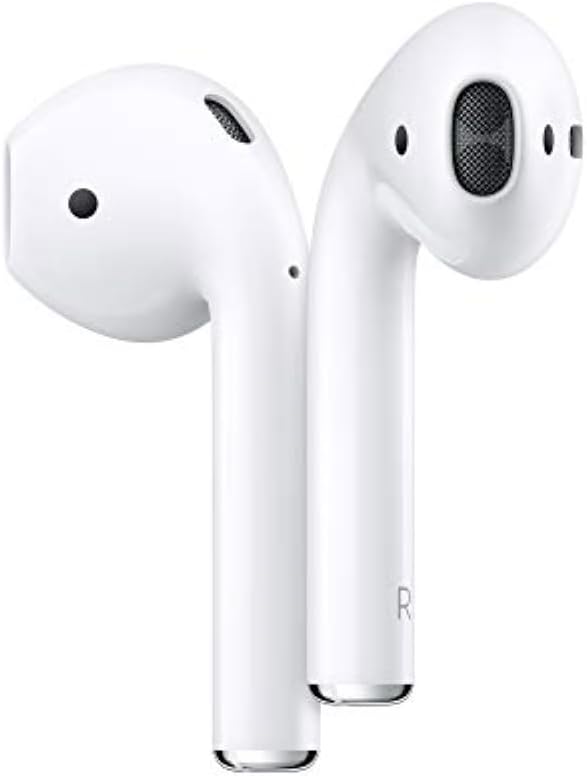
Apple AirPods (2nd Gen) Wireless Earbuds w/ Lightning Case - 24+ Hrs Battery, Easy Setup, Bluetooth Headphones for iPhone.
The Apple AirPods (2nd Generation) Wireless Earbuds with Lightning Charging Case Included are a must-have for anyone who wants to experience the ultimate in wireless listening tec…
Manual and instructions
Instruction-focused content generated from the current product data and source context.
Apple AirPods (2nd Generation) User Manual
Package Contents
- Apple AirPods (Left and Right)
- Lightning Charging Case
- Lightning Cable
- User Manual
Getting Started
Charging the AirPods
- Open the lid of the Lightning Charging Case.
- Insert the AirPods into the case with the left AirPod in the left slot and the right AirPod in the right slot.
- Connect the Lightning Cable to the Lightning port at the bottom of the Charging Case.
- Plug the other end of the Lightning Cable into a USB power adapter or a computer's USB port.
- Charge the AirPods until the LED indicator on the front of the case turns green.
Pairing the AirPods with an iPhone, iPad, or iPod touch
- Make sure your device is running iOS 12.2 or later.
- Turn on Bluetooth on your device by going to Settings > Bluetooth.
- Open the lid of the Charging Case, but do not remove the AirPods yet.
- Hold the Charging Case close to your device.
- A setup animation will appear on your device's screen.
- Tap "Connect" and follow the on-screen instructions to complete the pairing process.
Using the AirPods
- Remove the AirPods from the Charging Case.
- Place the AirPods in your ears.
- Control your audio playback and calls using the following gestures:
- Double-tap an AirPod to play or pause audio, or to answer or end a call.
- Say "Hey Siri" to activate Siri for voice commands.
Sharing Audio with Two Sets of AirPods
- Make sure both sets of AirPods are paired with your iPhone, iPad, iPod touch, or Apple TV.
- Start playing audio on your device.
- Open Control Center on your device.
- Tap the AirPlay icon next to the audio controls.
- Select "Share Audio" and follow the on-screen instructions to connect the second set of AirPods.
Frequently Asked Questions
- Q: Why don’t you ship to Alaska?
- A: It’s because of the lithium battery. However, the post office will ship lithium batteries if people go about it the right way. When a seller won’t ship to Alaska, it's because they don’t want to go through the hoops to ship lithium batteries there.
- Q: Are these fake?
- A: If you buy anything on Amazon, go through Prime so you can return right away if you get a fake. You can also take the product to an Apple store to see if the warranty is valid. That is how you will know if it’s a fake if they won’t honor it.
- Q: Does this come with a lightning cable?
- A: Yes, it comes with a lightning cable. It can be found by pulling up on the tab underneath where the AirPods case laid. It is underneath the bottom piece of cardboard. Do not throw the box away without first taking the cord out.
- Q: Why is this the same price as the first generation?
- A: Apple almost always keeps the price when a new version arrives. These are the latest AirPods, which are priced at Apple for $159.00. You could also get these same AirPods with a wireless case, for $199 at Apple.
- Q: Wow, I want to buy a protector case to protect it and will the wireless Charging still work with the case?
- A: There are cases available that protect AirPods and allow wireless charging through them. For example, the Twelve South AirSnap case is made of full-grain leather and is compatible with wireless charging.
- Q: Is this water-resistant?
- A: The Apple AirPods are not waterproof, but they are water and sweat resistant. They should work fine during workouts and in situations with moderate sweating.
- Q: Do the AirPods work on Android phones?
- A: They work great with Android phones. The only issue is you have to manually tap the Bluetooth setting to activate the pods. No Siri functionality is available on Android devices, but overall these are excellent wireless earbuds.
- Q: Are these the 2nd Generation?
- A: Yes, these are the 2nd Generation AirPods. They come with the A2032 and A2031 left and right AirPods and the A1602 Lightning Charging Case.
- Q: ¿Son genuinos?
- A: Sí, son de Apple y vienen en su respectiva caja, igual como si compraras directamente en Apple.
Frequently asked questions
Product: Apple AirPods (2nd Generation) Wireless Earbuds with Lightning Charging Case Included. Over 24 Hours of Battery Life, Effortless Setup. Bluetooth Headphones for iPhone - All Departments
Specifications:
- Brand: Apple
- Category: All Departments
- Ear Placement: In Ear
- Color: White
- Connectivity Technology: Bluetooth, NFC
- Model Name: AirPods
- Weight: AirPods
- Dimensions: AirPods
- AirPods Sensors (each): Dual beamforming microphones, Dual optical sensors, Motion-detecting accelerometer, Speech-detecting accelerometer
- Power and Battery: AirPods with Charging Case: More than 24 hours listening time, up to 18 hours talk time; AirPods
- Release Date: 3/20/2019
FAQ:
Q: Why don’t you ship to Alaska?
A: It’s because of the lithium battery. However, the post office will ship lithium batteries if people go about it the right way.
Q: Are these fake?
A: If you buy anything on Amazon, go through Prime so you can return right away if you get a fake. Check the warranty at an Apple store to ensure authenticity.
Q: Does this come with a lightning cable?
A: Yes, it comes with a lightning cable. It can be found by pulling up on the tab underneath where the air pods case laid.
Q: Why is this the same price as the first generation?
A: Apple almost always keeps the price when a new version arrives. These are the latest AirPods, which are priced at Apple for $159.00.
Q: Can I use a protective case with wireless charging?
A: Yes, these cases are full-grain leather and protect AirPods as well as allow wireless charging through them.
Q: Are these waterproof?
A: They are water and sweat-resistant.
Q: Do the AirPods work on Android phones?
A: They work great with Android phones, but you have to manually tap the Bluetooth setting to activate the pods. No Siri either.
Q: When will I receive my pre-order?
A: Delivery times vary, and you should check with the seller for an estimated delivery date.
Q: Are these the 2nd Generation?
A: The package includes A2032 and A2031 left and right AirPods (Apple calls both 2nd generation), and the package also includes a A1602 case (Apple calls this Lightning Charging Case). From what I can see, Apple never quite calls the included Lightning Charging Case a gen 1 product but lots of other sellers do.
Source documents
Official manuals and related source files discovered for this product.

Specifications
Structured product details pulled from the latest available product data.
| Brand | Apple |
|---|---|
| Manufacturer | Apple |
| Model Number | MV7N2AM/A |
| Color | White |
| Material | Plastic |
| Weight | 3.5 ounces |
| Dimensions | 0.65 x 0.71 x 1.59 inches |
| First Available | March 20, 2019 |
| Headphones Jack | 3.5 mm Jack |
| Model Name | AirPods |
| Connectivity Technology | Bluetooth 5.0 |
| Wireless Communication Technology | NFC, Bluetooth, Apple H1 Chip |
| Included Components | Apple AirPods with Wired Charging Case |
| Age Range (Description) | Adult |
| Specific Uses For Product | Music |
| Compatible Devices | iPhone,iPad,iPod touch,Apple TV |
| Theme | TV Series |
| Control Type | Volume Control, Media Control, Voice Control, Call Control |
| Cable Feature | Without Cable |
| Item Weight | 3.5 Ounces |
| Water Resistance Level | Water Resistant |
| Unit Count | 1.0 Count |
| Style | AirPods + Charging Case |
| Control Method | Touch |
| Number of Items | 1 |
| Battery Life | 24 Hours |
| UPC | 190199098428 |
| Global Trade Identification Number | 00190199098428 |
| Product Dimensions | 0.65 x 0.71 x 1.59 inches |
| ASIN | B07PXGQC1Q |
| Item model number | MV7N2AM/A |
| Batteries | 2 Lithium Metal batteries required. (included) |
| Is Discontinued By Manufacturer | No |
| Date First Available | March 20, 2019 |
| Ear Placement | In Ear |
| Form Factor | In Ear |
| Noise Control | Sound Isolation |
| Size and Weight | AirPods (each)Height: 1.59 inches (40.5 mm)Width: 0.65 inch (16.5 mm)Depth: 0.71 inch (18.0 mm)Weight: 0.14 ounce (4 grams)Lightning Charging Case or Wireless Charging CaseHeight: 2.11 inches (53.5 mm)Width: 1.74 inches (44.3 mm)Depth: 0.84 inch (21.3 mm)Weight: 1.35 ounces (38.2 grams) |
| Charging Case | Lightning Charging CaseWorks with Lightning ConnectorWireless Charging CaseWorks with Qi-certified chargers or the Lightning connector |
| Battery | AirPodsUp to 5 hours of listening time with a single chargeUp to 3 hours of talk time with a single chargeAirPods with Lightning Charging Case or Wireless Charging CaseMore than 24 hours of listening timeUp to 18 hours of talk time15 minutes in the case provides up to 3 hours listening time or up to 2 hours talk time |
| Compatibility | iPhone ModelsiPhone 6s or lateriPhone SE (1st generation) or lateriPod ModelsiPod touch (7th generation)Mac ModelsMacBook (Retina, 12-inch, Early 2015–2017)MacBook Air (Mid 2012) or laterMacBook Pro (Mid 2012) or lateriMac (Late 2012) or lateriMac Pro (2017)Mac mini (Late 2012) or laterMac Studio (2022) or laterMac Pro (Late 2013) or lateriPad ModelsiPad Pro 9.7-inch or later iPad (5th generation) or lateriPad Air 2 or lateriPad mini 4 or laterApple Watch Models All Apple Watch ModelsApple TV ModelsApple TV 4KApple TV HD |
| Controls | Double-tap to play, skip forward, or answer a phone callSay “Hey Siri” to do things like play a song, make a call, or get directions |
| Sensors | Dual beamforming microphonesDual optical sensorsMotion-detecting accelerometerSpeech-detecting accelerometer |
| Chip | H1 headphone chip |
| Connectivity | Bluetooth 5.0 wireless technology |
| In the Box | AirPodsLightning Charging Case or Wireless Charging CaseLightning to USB-A Cable |
Use this page carefully
ProductReviewGPT pages are AI-assisted summaries. When a source document is available, it should take priority over the generated summary for important operating, warranty, safety, or compliance details.