
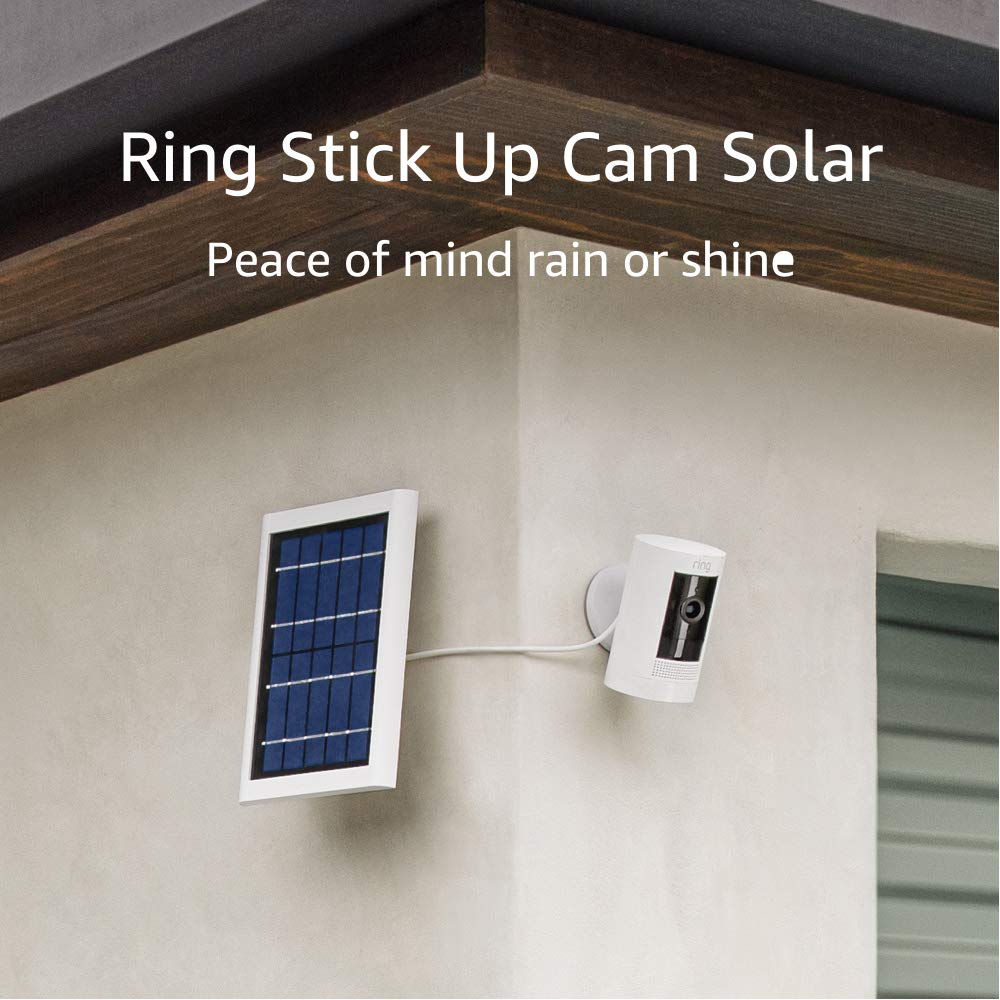
Ring Stick Up Cam Solar HD - Works with Alexa.
The Ring Stick Up Cam Solar HD security camera is the perfect solution for anyone looking to keep their home safe and secure. With its 1080p HD video quality and 130-degree diagon…
Manual and instructions
Instruction-focused content generated from the current product data and source context.
Ring Stick Up Cam Solar HD Security Camera User Manual
Package Contents
- Stick Up Cam Battery
- Quick Release Battery Pack
- Solar Panel
- Micro USB Charging Cable
- User Manual
- Security Sticker
- Screws and Wall Anchors
Installation
- Choose a location for your Stick Up Cam Solar with good Wi-Fi signal strength and access to sunlight.
- Using the included screws and wall anchors, mount the Solar Panel at an angle where it can receive direct sunlight.
- Mount the Stick Up Cam Battery using the integrated mounting base/stand. Adjust the angle as needed.
- Insert the Quick Release Battery Pack into the Stick Up Cam Battery.
- Plug the Solar Panel into the Stick Up Cam Battery using the Micro USB Charging Cable.
- Download the Ring app on your smartphone or tablet, and follow the in-app instructions to connect your Stick Up Cam Solar to Wi-Fi.
Using the Ring App
With the Ring app, you can access Live View, customize privacy zones, enable audio privacy, and adjust motion sensitivity settings. To access these features:
- Open the Ring app and sign in to your account.
- Select your Stick Up Cam Solar from the list of devices.
- Use the app to access Live View, customize settings, and view recorded videos (with a Ring Protect Plan subscription).
Pairing with Alexa
To pair your Stick Up Cam Solar with Alexa for added peace of mind:
- Open the Alexa app on your smartphone or tablet.
- Go to the Skills & Games section and search for "Ring."
- Enable the Ring skill and sign in to your Ring account.
- Follow the in-app instructions to connect your Stick Up Cam Solar to Alexa.
Troubleshooting Tips
Wi-Fi Connection Issues
If your Stick Up Cam Solar is experiencing poor Wi-Fi connection:
- Ensure your Wi-Fi router is within range and has a strong signal.
- Test the Wi-Fi signal strength at the camera location using a smartphone or tablet.
- Consider using a Wi-Fi extender or upgrading your router for better coverage.
Low Battery or Solar Panel Issues
If your Stick Up Cam Solar is not charging or has a low battery:
- Ensure the Solar Panel is receiving direct sunlight for at least 6 hours per day.
- Check the Micro USB Charging Cable connection between the Solar Panel and the Stick Up Cam Battery.
- Test the Quick Release Battery Pack using the Ring app to ensure it is functioning properly.
Motion Detection Issues
If your Stick Up Cam Solar is not detecting motion as expected:
- Adjust the motion sensitivity settings in the Ring app.
- Ensure the camera is positioned correctly to capture the desired area.
Frequently Asked Questions
Can I use the Stick Up Cam Solar indoors?
Yes, the Stick Up Cam Solar can be used indoors or outdoors. However, the Solar Panel must be placed in an area that receives direct sunlight for optimal charging.
How long does the battery last on the Stick Up Cam Solar?
With proper sunlight exposure, the Solar Panel should keep the battery charged, maintaining a battery level of 99% or higher. Without the Solar Panel, the battery life will vary depending on usage and settings.
Can I connect multiple Stick Up Cam Solar devices to the Ring app?
Yes, you can connect and manage multiple Stick Up Cam Solar devices through the Ring app.
What is the warranty and service for the Stick Up Cam Solar?
The Stick Up Cam Solar comes with a 1-year limited warranty and service. Additional terms and conditions can be found on the Ring website.
Do I need a Ring Protect Plan subscription to use the Stick Up Cam Solar?
No, you do not need a Ring Protect Plan subscription to use the Stick Up Cam Solar. However, a subscription is required to record videos, review missed events, and share videos and photos.
Frequently asked questions
Q: What is the Ring Stick Up Cam Solar?
A: The Ring Stick Up Cam Solar is a security camera that can be used to monitor your home. It uses solar power and includes two-way talk, night vision, and customizable privacy zones.
Q: What are the features of the Ring Stick Up Cam Solar?
A: The Ring Stick Up Cam Solar includes live view, two-way talk with noise cancellation, 1080p HD video, night vision, customizable privacy zones, and audio privacy. It can be powered by a quick-release battery pack or the included solar panel.
Q: Does the Ring Stick Up Cam Solar require a subscription?
A: A Ring Protect Plan subscription (sold separately) is required to record and save videos. With a subscription, you can access recorded videos for up to 60 days and share videos and photos.
Q: How do I install the Ring Stick Up Cam Solar?
A: The Ring Stick Up Cam Solar can be easily set up by plugging in the solar panel and connecting to Wi-Fi. It can be placed on a flat surface or mounted to a wall using the included hardware.
Q: What is the operating temperature range for the Ring Stick Up Cam Solar?
A: The Ring Stick Up Cam Solar can operate in temperatures ranging from -5°F to 122°F.
Q: Can I use one solar panel to power multiple cameras?
A: No, each solar panel has only one connector and each camera has only one connection point for a plug. Using one solar panel for multiple cameras would require modifying the connectors, which could void the warranty.
Q: Does the Ring Stick Up Cam Solar work with Alexa?
A: Yes, the Ring Stick Up Cam Solar works with Alexa to provide added peace of mind.
Q: What is included in the box?
A: The box includes the Stick Up Cam Battery, Quick Release Battery Pack, Solar Panel, Micro USB Charging Cable, User Manual, Security Sticker, Screws and Wall Anchors.
Q: What is the warranty for the Ring Stick Up Cam Solar?
A: The Ring Stick Up Cam Solar comes with a 1-year limited warranty and service. Use of security cameras is subject to the terms found on the Ring website.
Q: What colors are available for the Ring Stick Up Cam Solar?
A: The Ring Stick Up Cam Solar is available in white or black.
Specifications
Structured product details pulled from the latest available product data.
| Brand | Ring |
|---|---|
| Color | White, Black |
| Average Install Time | 5-15 minutes |
| Video | 1080p HD, Live View, Night Vision |
| Field of view | 130° diagonal, 110° horizontal, 57° vertical |
| Audio | Two-way talk with noise cancellation |
| Power source | Quick-Release Battery Pack, Solar Panel |
| Internet requirements | Requires high speed internet |
| Connectivity | 802.11 b/g/n Wi-Fi connection @ 2.4 GHz |
| Operating conditions | -5°F to 122°F |
| Available colors | White, Black |
| Mounting base | Integrated mounting base/stand with adjustable angle. Can sit freestanding or mount to a wall. |
| Dimensions | 2.36 in. x 2.36 in. x 3.82 in. |
| Box includes | Stick Up Cam Battery, Quick Release Battery Pack, Solar Panel, Micro USB Charging Cable, User Manual, Security Sticker, Screws and Wall Anchors. |
| Warranty and service | 1-year limited warranty and service included. Use of Security Cameras is subject to the terms found here. License information can be found here. |
| Support | Click here to view more information on the Security Cameras support page. Click here to learn more information about Linked Devices. |
| Generation | Ring Stick Up Cam Solar – 3rd Generation |
| Ring Protect Plan | By purchasing, you authorize us to charge your default card or another card on file when you attach the subscription to a device. Learn more about subscription features and additional terms and conditions. |
Use this page carefully
ProductReviewGPT pages are AI-assisted summaries. When a source document is available, it should take priority over the generated summary for important operating, warranty, safety, or compliance details.