
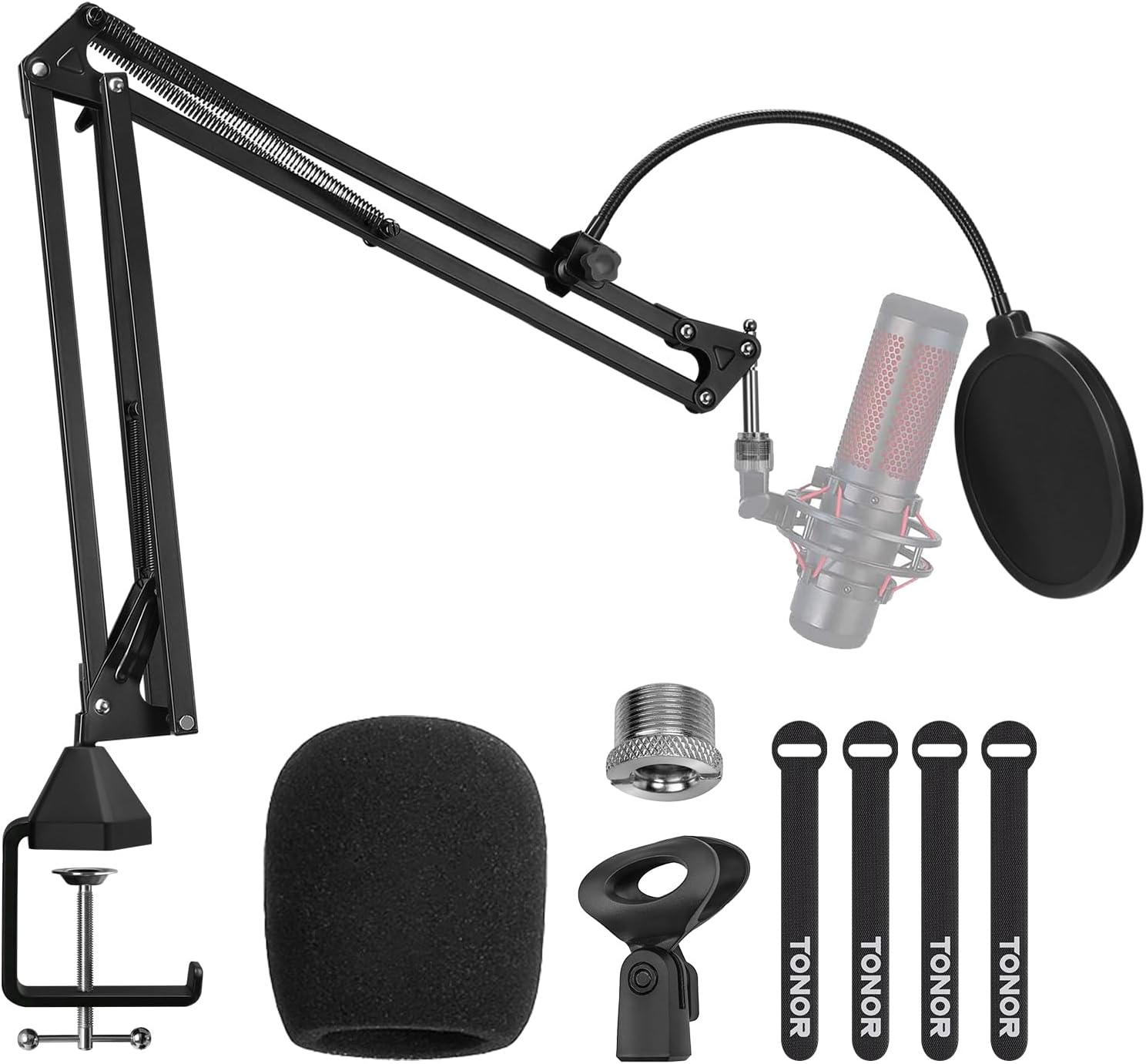
TONOR Microphone Arm Stand with Pop Filter (T20)
The TONOR T20 Microphone Suspension Scissor Arm Stand is an excellent addition to any recording setup. Made of durable steel, this stand can support up to 4lbs/1.8kg, making it pe…
Manual and instructions
Instruction-focused content generated from the current product data and source context.
TONOR T20 Microphone Suspension Scissor Arm Stand User Manual
Package Contents
- 1 x Boom arm
- 1 x Desk clamp
- 1 x Mic clip
- 1 x 3/8" to 5/8" Adapter
- 1 x Pop filter
- 1 x Foam cover
- 4 x Cable tie
- 1 x Manual
- 1 x After-sales card
Assembly Instructions
- Attach the desk clamp to the edge of your desk by turning the clamp screw counterclockwise to open it, positioning it on the desk, and then turning the screw clockwise to tighten it.
- Insert the boom arm into the desk clamp and tighten the screw to secure it in place.
- Attach the mic clip to the end of the boom arm by screwing it onto the 3/8" thread. If your microphone or shock mount requires a 5/8" thread, use the included 3/8" to 5/8" adapter.
- Place your microphone into the mic clip or shock mount.
- Attach the pop filter to the boom arm by clamping it onto the arm and adjusting its position in front of the microphone.
- Slide the foam cover over the microphone, if desired.
- Use the included cable ties to secure your microphone cable along the boom arm, keeping it neat and organized.
Adjustment Instructions
The TONOR T20 Microphone Suspension Scissor Arm Stand offers 700mm horizontal/vertical distance and 360° full rotation. To adjust the position of the microphone, simply move the boom arm and rotate the joints as needed. Be sure not to exceed the maximum load capacity of 4lbs/1.8kg or the maximum horizontal/vertical length of 27.6"/700mm.
Troubleshooting Tips
- Boom arm not staying in position: Make sure the joints and screws are tightened properly. If the problem persists, check if the microphone's weight exceeds the maximum load capacity of 4lbs/1.8kg.
- Microphone not fitting in the mic clip: Ensure that you are using the correct thread size (3/8" or 5/8") for your microphone or shock mount. Use the included adapter if necessary.
- Pop filter not staying in place: Check that the clamp is securely fastened to the boom arm and that the filter is positioned correctly in front of the microphone.
- Vibration noise during use: Ensure that the desk clamp is tightened securely and that the microphone cable is secured with the cable ties to prevent it from touching the boom arm or desk.
Frequently Asked Questions
- Q: Can I use the T20 with a Blue Yeti microphone?
- A: Yes, the T20 is compatible with the Blue Yeti microphone. Simply use the included 3/8" to 5/8" adapter to attach the microphone to the boom arm.
- Q: What is the maximum desk thickness that the clamp can accommodate?
- A: The desk clamp can accommodate desks up to 2.4"/60mm thick.
- Q: Is the microphone and shock mount included with the T20?
- A: No, the microphone and shock mount are not included. The T20 comes with a boom arm, desk clamp, mic clip, 3/8" to 5/8" adapter, pop filter, foam cover, cable ties, manual, and after-sales card.
- Q: Can I use this stand with other microphones besides the Blue Yeti and Snowball?
- A: Yes, the T20 is compatible with most microphones, as long as they have a standard 3/8" or 5/8" thread and do not exceed the maximum load capacity of 4lbs/1.8kg.
Frequently asked questions
Product FAQ:
Q: What are the differences between this suspension stand and Innogear's stand?
A: The TONOR T20 suspension stand has a maximum load capacity of 1800g, while the Innogear stand can support up to 1000g. Additionally, the desk clamp area of the TONOR T20 is 38c㎡, compared to Innogear's 9c㎡. The TONOR T20 can also support desk thicknesses up to 6cm, while the Innogear stand can only support up to 4.5cm. Finally, the TONOR T20 comes with three support frames, while the Innogear stand only has two.
Q: Can the stand be adjusted freely?
A: Yes, the port of the desk clamp has a sleek design that allows the arm stand to rotate 360 degrees. Additionally, with a maximum adjustable angle of 180 degrees, you can conveniently set it to your desired height and angle.
Q: Does this work with the Blue Snowball Ice?
A: Yes, with the included 3/8" to 5/8" adapter, you can easily mount your Blue Snowball Ice onto the arm stand. For more information on compatibility and how to connect your specific model of Blue Snowball Ice to the arm stand, please refer to this page: https://www.tonormic.com/pages/t20
Q: How wide does the clamp open? I have a relatively thick desk that is about 2 & 3/8", so I'm already pushing it based off of the product specifications.
A: The desk clamp can be adjusted and clipped onto desks with a maximum thickness of up to 6cm.
Q: How does this compare to the Rode PSA1 Swivel Mount Studio?
A: The TONOR T20 suspension stand is made of durable steel and allows for 360-degree rotation, with a maximum load capacity of 1800g. The Rode PSA1 has a similar design and also allows for 360-degree rotation, but has a maximum load capacity of approximately 1700g. Additionally, the Rode PSA1 is heavier than the TONOR T20 by about 200-300g. Finally, while the Rode PSA1 is designed for heavy microphones, its arm stand spring may be too strong for lighter microphones, causing the arm stand to pop up. The TONOR T20 is designed to support both light and heavy microphones.
Q: Should I keep the arm fully extended vertically when I'm not using it to keep tension off the springs? Does it matter?
A: While it may be smart to do so in the long run, keeping the arm fully extended vertically when not in use should not significantly affect the springs.
Q: It is flipped looking the wrong way. I can't get it into place.
A: You can flip the part that holds the microphone up or down to use it in your preferred orientation.
Q: Does this work with SM7B?
A: While we have not tested it with the SM7B, we believe that it may be too heavy for this boom as it comes. You may be able to replace the springs with stronger ones to make it work, but we recommend purchasing a heavy-duty boom rated to hold heavier microphones instead.
Q: Do you have an update on when this will become available again?
A: The product is currently available.
Q: To clip the arm stand's desk clamp onto my desk, what should be the maximum thickness of the desk?
A: The desk clamp of the stand can be freely adjusted and clipped onto desks with a maximum thickness of up to 6cm.
Source documents
Official manuals and related source files discovered for this product.


Specifications
Structured product details pulled from the latest available product data.
| Brand | TONOR |
|---|---|
| Model Number | 120104 |
| Category | Musical Instruments > Microphones & Accessories > Accessories > Stands |
| Color | Blue |
| Material | Alloy Steel |
| Weight | 1.78 pounds |
| Dimensions | 18.31 x 6.65 x 3.9 inches |
| First Available | December 18, 2019 |
| Item Weight | 1.78 pounds |
| Product Dimensions | 18.31 x 6.65 x 3.9 inches |
| ASIN | B082W4B7SX |
| Item model number | 120104 |
| Customer Reviews | 4.6 4.6 out of 5 stars 12,015 ratings 4.6 out of 5 stars |
| Best Sellers Rank | #4,853 in Musical Instruments (See Top 100 in Musical Instruments) #131 in Microphone Stands |
| Date First Available | December 18, 2019 |
| Body Material | steel |
| Color Name | Blue |
| Material Type | Alloy Steel |
| Size | 13.8''+13.8'' |
| Item Weight | 807 Grams |
| Item dimensions L x W x H | 18.31 x 6.65 x 3.9 inches |
Use this page carefully
ProductReviewGPT pages are AI-assisted summaries. When a source document is available, it should take priority over the generated summary for important operating, warranty, safety, or compliance details.