
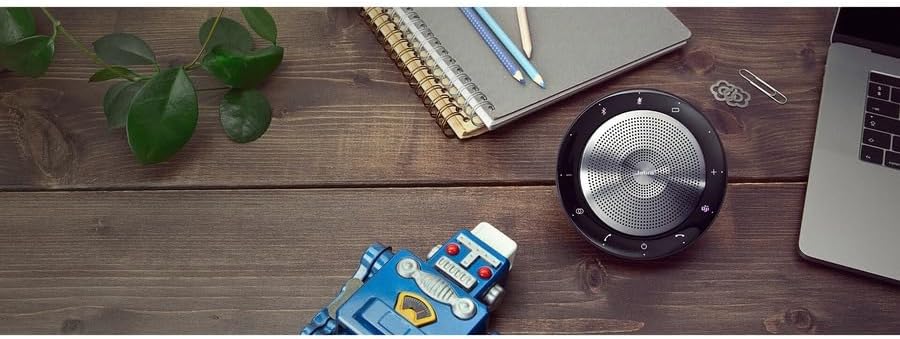
Jabra Speak 750-UC Speakerphone - Electronics (Jabra)
The Jabra Speak 750-UC Speakerphone is a premium conference call speaker that is engineered to power your meetings with seamless, premium audio. With full duplex sound for more na…
Manual and instructions
Instruction-focused content generated from the current product data and source context.
Jabra Speak 750-UC Speakerphone User Manual
Table of Contents
- Introduction
- Package Contents
- Setting Up Your Jabra Speak 750
- Connecting to Devices
- Using the Jabra Speak 750
- Troubleshooting Tips
- Frequently Asked Questions
1. Introduction
Welcome to your new Jabra Speak 750-UC Speakerphone! This user manual will guide you through setting up, connecting, and using your new speakerphone for seamless, premium audio in your meetings and conference calls.
2. Package Contents
- Jabra Speak 750 Speakerphone
- Soft Pouch
- Link 370 BT USB Adapter
- Quick Start Guide
- Warning and Warranty Leaflets
3. Setting Up Your Jabra Speak 750
- Unpack your Jabra Speak 750 and its accessories from the box.
- Place the speakerphone on a flat surface in the center of the meeting area.
- For optimal sound quality, ensure that the speakerphone is positioned at least 30 cm (12 inches) away from any walls or obstructions.
4. Connecting to Devices
Your Jabra Speak 750 can be connected to your devices via USB or Bluetooth.
- USB Connection: Connect the USB cable from the Jabra Speak 750 to your laptop or computer. The speakerphone will automatically be recognized as an audio device.
- Bluetooth Connection: Press and hold the Bluetooth button on the Jabra Speak 750 until the LED indicator starts flashing blue. On your smartphone or tablet, go to the Bluetooth settings and select "Jabra Speak 750" from the list of available devices. Once connected, the LED indicator will turn solid blue.
5. Using the Jabra Speak 750
Once connected, you can use the Jabra Speak 750 for meetings, conference calls, and audio playback.
- Answer/End Call: Press the Call button to answer or end a call.
- Volume Control: Press the '+' or '-' buttons to increase or decrease the volume.
- Mute/Unmute: Press the Mute button to mute or unmute the microphone.
- Bluetooth Pairing: Press and hold the Bluetooth button to initiate pairing mode.
- Microsoft Teams Button (Teams variant only): Press the dedicated Teams button to launch Microsoft Teams and receive notifications about calls and meetings.
6. Troubleshooting Tips
- If your Jabra Speak 750 is not connecting to your device, ensure that the USB cable is properly connected or that the speakerphone is in pairing mode for Bluetooth connections.
- If you experience audio issues, check the audio settings on your device to make sure the Jabra Speak 750 is selected as the default audio device for both input and output.
- For Bluetooth connectivity issues, try moving your device closer to the speakerphone or removing any obstacles that may cause interference.
- If the speakerphone is not functioning properly, try resetting it by pressing and holding the Call, Mute, and Volume '+' buttons simultaneously for 10 seconds.
7. Frequently Asked Questions
- Can I use the Jabra Speak 750 with multiple devices at the same time?
Yes, you can connect the Jabra Speak 750 to one device via USB and up to two devices via Bluetooth simultaneously. - How long does the battery last on the Jabra Speak 750?
The battery life on the Jabra Speak 750 offers up to 11 hours of talk time. - Is the Jabra Speak 750 compatible with all leading Unified Communications platforms?
Yes, the Jabra Speak 750 is compatible with all leading UC platforms, including Microsoft Teams and Skype for Business. - What is the wireless range of the Jabra Speak 750 when using the Bluetooth adapter?
The wireless range of the Jabra Speak 750 is up to 30 meters (98 feet) when using the Link 370 Bluetooth adapter.
Frequently asked questions
Product FAQ:
Q: What is the Jabra Speak 750?
A: The Jabra Speak 750 is a conference call speakerphone that is engineered to power your meetings with seamless, premium audio. It features full duplex sound for more natural conversations, UC and Microsoft Teams certification & plug-and-play capability, and maximum flexibility for your huddle room.
Q: What are the key features of the Jabra Speak 750?
A: The key features of the Jabra Speak 750 include:
- Full duplex audio for natural conversations
- Plug-and-play quick easy setup
- Intuitive connectivity via USB or Bluetooth
- Easy integration with all leading UC platforms
- Dedicated Teams button for Microsoft Teams variant
Q: Is the Jabra Speak 750 compatible with Mac?
A: Yes, the Jabra Speak 750 works perfectly with Mac. However, you need to select it as your sound input and output device in System Preferences.
Q: Can I connect more than one Jabra Speak 750 together to cover a larger room?
A: No, you can only link up to two units of the Jabra Speak 710 model. The USB version (Jabra Speak 410) cannot be daisy-chained.
Q: Can I use the Jabra Speak 750 as a recording microphone when connected to a computer?
A: Yes, you can use the Jabra Speak 750 as a recording microphone connected to your computer.
Q: Does the Jabra Speak 750 work with WebEx VoIP capabilities?
A: Yes, the Jabra Speak 750 works great with WebEx VoIP capabilities. Your laptop will recognize it as both a speaker and a microphone that can be selected like a USB headset.
Q: Can I connect multiple Jabra Speak 750s to my cell phone at one time to serve as multiple microphones and speakers in a large room?
A: No, you cannot connect multiple Jabra Speak 750s to your cell phone at one time. Only the Jabra Speak 510 model can be paired with a cell phone via Bluetooth.
Q: Can I use the Jabra Speak 750 while it's charging?
A: Yes, you can use the Jabra Speak 750 while it's charging. It charges whenever it discovers a USB connection, whether it's in use or not.
Q: What is the weight of the Jabra Speak 750?
A: The Jabra Speak 750 weighs 301g.
Q: What is included in the package of the Jabra Speak 750?
A: The package includes the Jabra Speak 750, soft pouch, Link 370 BT USB adapter, quick start guide, warning and warranty leaflets.
Specifications
Structured product details pulled from the latest available product data.
| Brand | Jabra |
|---|---|
| Manufacturer | Jabra |
| Model Number | 7700-409 |
| Category | Electronics > Portable Audio & Video > Portable Speakers & Docks > Portable Bluetooth Speakers |
| Color | Black |
| Material | Plastic |
| Weight | 0.43 Pounds |
| Speaker Maximum Output Power | 750 Watts |
| Frequency Response | 20 KHz |
| Connectivity Technology | Bluetooth, Wireless |
| Audio Output Mode | Stereo |
| Mounting Type | Portable,Usb |
| Enclosure Material | Plastic |
| Speaker Type | Portable |
| Additional Features | Bluetooth A2DP, Echo Cancellation, Full-duplex, Mute, Voice Guidance |
| Antenna Location | For Smartphones or Tablets |
| Controller Type | Voice Control |
| Battery Average Life | 11 Hours |
| Is Waterproof | False |
| Warranty Type | Full Warranty |
| Control Method | Voice |
| Speaker Size | 4.9 Inches |
| Bluetooth Range | 32 Feet |
| Number of Microphones | 2 |
| MP3 player | No |
| Specific Uses For Product | calls and meetings |
| Unit Count | 1.0 Count |
| Item Dimensions D x W x H | 4.9"D x 4.9"W x 1.3"H |
| Item Weight | 0.43 Pounds |
| Compatible Devices | Phone |
| Power Source | Battery Powered |
| Number of Batteries | 2 Lithium Ion batteries required. (included) |
| Is Electric | Yes |
| Model Name | Speak 750 |
| Built-In Media | Speak 750, Soft Pouch, Link 370 BT USB Adapter, Quick Start Guide, Warning and Warranty Leaflets |
| Number of Items | 1 |
| UPC | 706487020677 |
| Item Type Name | Bluetooth Speakerphone |
| Warranty Description | 2 year |
| Best Sellers Rank | #2,183 in Electronics (See Top 100 in Electronics) #54 in Portable Bluetooth Speakers |
| ASIN | B08CM1BCQB |
| Customer Reviews | 4.3 4.3 out of 5 stars (327) 4.3 out of 5 stars |
| Number of Audio Channels | 2.0 |
| Wireless Technology | Bluetooth |
| Subwoofer Connectivity Technology | Wireless |
| Connectivity Protocol | Bluetooth |
| Battery Charge Time | 3 Hours |
| Audio Driver Type | Dynamic Driver |
| Number Of Circuits | 1 |
| GTIN | 706487020677 |
Use this page carefully
ProductReviewGPT pages are AI-assisted summaries. When a source document is available, it should take priority over the generated summary for important operating, warranty, safety, or compliance details.