
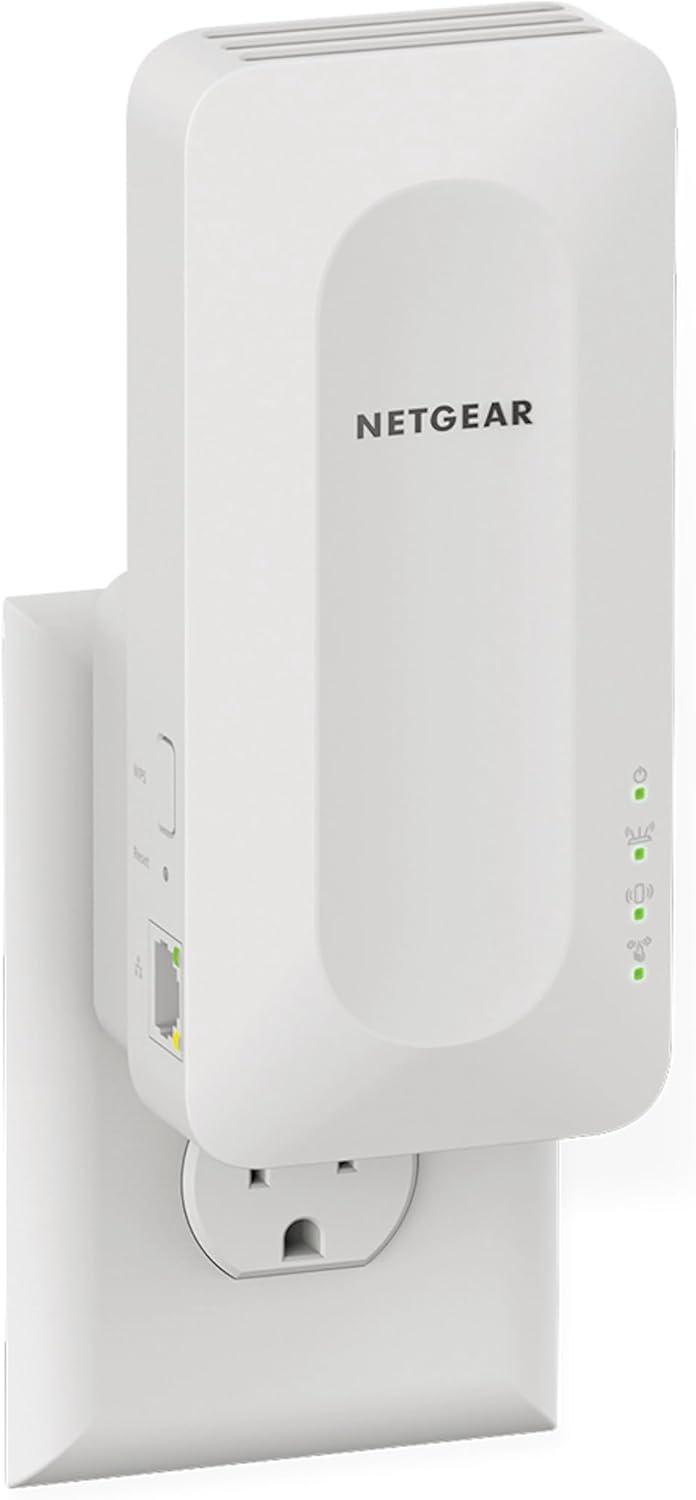
NETGEAR WiFi 6 Mesh Range Extender - EAX15
The NETGEAR WiFi 6 Mesh Range Extender (EAX15) is a powerful and reliable device that can add up to 1,500 sq. ft. of coverage to your existing WiFi network. This dual-band wireles…
Manual and instructions
Instruction-focused content generated from the current product data and source context.
NETGEAR WiFi 6 Mesh Range Extender (EAX15) User Manual
Table of Contents
- Package Contents
- Device Overview
- Initial Setup
- Connecting Devices
- Advanced Configuration
- Troubleshooting Tips
- Frequently Asked Questions
1. Package Contents
Inside the package, you should find the following items:
- NETGEAR EAX15 WiFi 6 Mesh Range Extender
- Quick Start Guide
2. Device Overview
The NETGEAR EAX15 WiFi 6 Mesh Range Extender is designed to boost your existing WiFi signal and extend its coverage up to 1,500 sq. ft. It supports AX1800 dual-band wireless signal with up to 1.8Gbps speed and WPA3 security. The device has a discreet wall plug design and features one Gigabit Ethernet port for wired connections.
3. Initial Setup
- Plug the EAX15 into a wall outlet near your router.
- Wait for the Power LED to turn solid green. This may take up to 2 minutes.
- On your WiFi-enabled device (e.g., smartphone, tablet, or laptop), open the WiFi settings and connect to the extender's default network, named "NETGEAR_EXT".
- Open a web browser and go to http://www.mywifiext.net. The NETGEAR Installation Assistant will guide you through the setup process.
- Follow the on-screen instructions to connect the extender to your existing WiFi network.
- Once connected, move the extender to a location halfway between your router and the area with a weak WiFi signal.
- Reconnect your WiFi devices to the extended network.
4. Connecting Devices
To connect your devices to the extended WiFi network:
- On your device, open the WiFi settings.
- Select the extended network name (SSID), which is your existing network name with "_EXT" added to the end.
- Enter the same password as your existing WiFi network.
5. Advanced Configuration
To access advanced configuration settings, follow these steps:
- Connect your device to the extended network.
- Open a web browser and go to http://www.mywifiext.net.
- Enter your admin email and password. If you have not set up an admin account, follow the on-screen instructions to create one.
- Once logged in, you can access advanced settings such as changing the network name, security settings, and more.
6. Troubleshooting Tips
- If the Power LED does not turn solid green, try a different wall outlet.
- If you cannot connect to the extender's default network, try resetting the extender by pressing the Reset button for 7 seconds.
- If you experience connection issues, move the extender closer to your router.
- For optimal performance, ensure your router and extender are running the latest firmware.
- If you encounter issues during the firmware update, try resetting the extender to factory settings and updating the firmware again.
7. Frequently Asked Questions
- What is the maximum range of the EAX15?
- The EAX15 can extend your WiFi coverage up to 1,500 sq. ft.
- Can I use the EAX15 with non-Netgear routers?
- Yes, the EAX15 is compatible with any wireless router or cable modem with WiFi.
- How do I update the firmware on my EAX15?
- Log in to the extender's web interface at http://www.mywifiext.net and go to the firmware update section. Follow the on-screen instructions to update the firmware.
- Does the EAX15 support WPA3?
- Yes, the EAX15 supports WPA3 security.
- Can I connect wired devices to the EAX15?
- Yes, you can connect wired devices such as PCs, gaming consoles, and streaming players to the EAX15's Gigabit Ethernet port.
Frequently asked questions
Q: What is the model number of this NETGEAR range extender?
A: The model number of this NETGEAR range extender is EAX15-100NAS.
Q: How much coverage does this range extender add?
A: This range extender adds up to 1,500 sq. ft. of coverage.
Q: How many devices can be connected to this range extender?
A: This range extender can connect up to 20+ devices such as laptops, smartphones, speakers, IP cameras, tablets, IoT devices, and more.
Q: What is the WiFi speed of this range extender?
A: This range extender has a WiFi speed of up to 1.8Gbps using Dual-Band WiFi technology (up to 600 + 1200 Mbps).
Q: Does this range extender require an Ethernet cable?
A: No, this range extender does not require an Ethernet cable. It simply plugs into any wall outlet.
Q: Is this range extender compatible with any wireless router or cable modem with WiFi?
A: Yes, this range extender is compatible with any wireless router or cable modem with WiFi and is optimized for all WiFi 6 routers.
Q: How many wired Ethernet ports does this range extender have?
A: This range extender has one Gigabit Ethernet port for maximum speed.
Q: What is the network security of this range extender?
A: This range extender has WPA2 / WPA3 network security.
Q: Is setup and management easy for this range extender?
A: Yes, setup and management are easy with the Nighthawk app which provides step-by-step instructions to set up an extended WiFi network.
Q: Can this range extender be used as a Zigbee extender?
A: No, this range extender cannot be used as a Zigbee extender as Zigbee is a different protocol that requires a different solution.
Source documents
Official manuals and related source files discovered for this product.


Specifications
Structured product details pulled from the latest available product data.
| Brand | NETGEAR |
|---|---|
| Manufacturer | NETGEAR |
| Model Number | EAX15-100NAS |
| Category | Electronics > Computers & Accessories > Networking Products > Repeaters |
| Weight | 7.8 ounces |
| Dimensions | 7.2 x 4.3 x 4.6 inches |
| First Available | October 13, 2020 |
| Product Dimensions | 7.2 x 4.3 x 4.6 inches |
| Item Weight | 7.8 ounces |
| ASIN | B08K2ZX2RY |
| Item model number | EAX15-100NAS |
| Customer Reviews | 4.0 4.0 out of 5 stars 1,140 ratings 4.0 out of 5 stars |
| Best Sellers Rank | #56 in Repeaters |
| Date First Available | October 13, 2020 |
| Wireless Communication Standard | 802.11ax |
| Data Transfer Rate | 1200 Megabits Per Second |
| Frequency Band Class | Dual-Band |
| Connector Type | RJ45 |
Use this page carefully
ProductReviewGPT pages are AI-assisted summaries. When a source document is available, it should take priority over the generated summary for important operating, warranty, safety, or compliance details.