
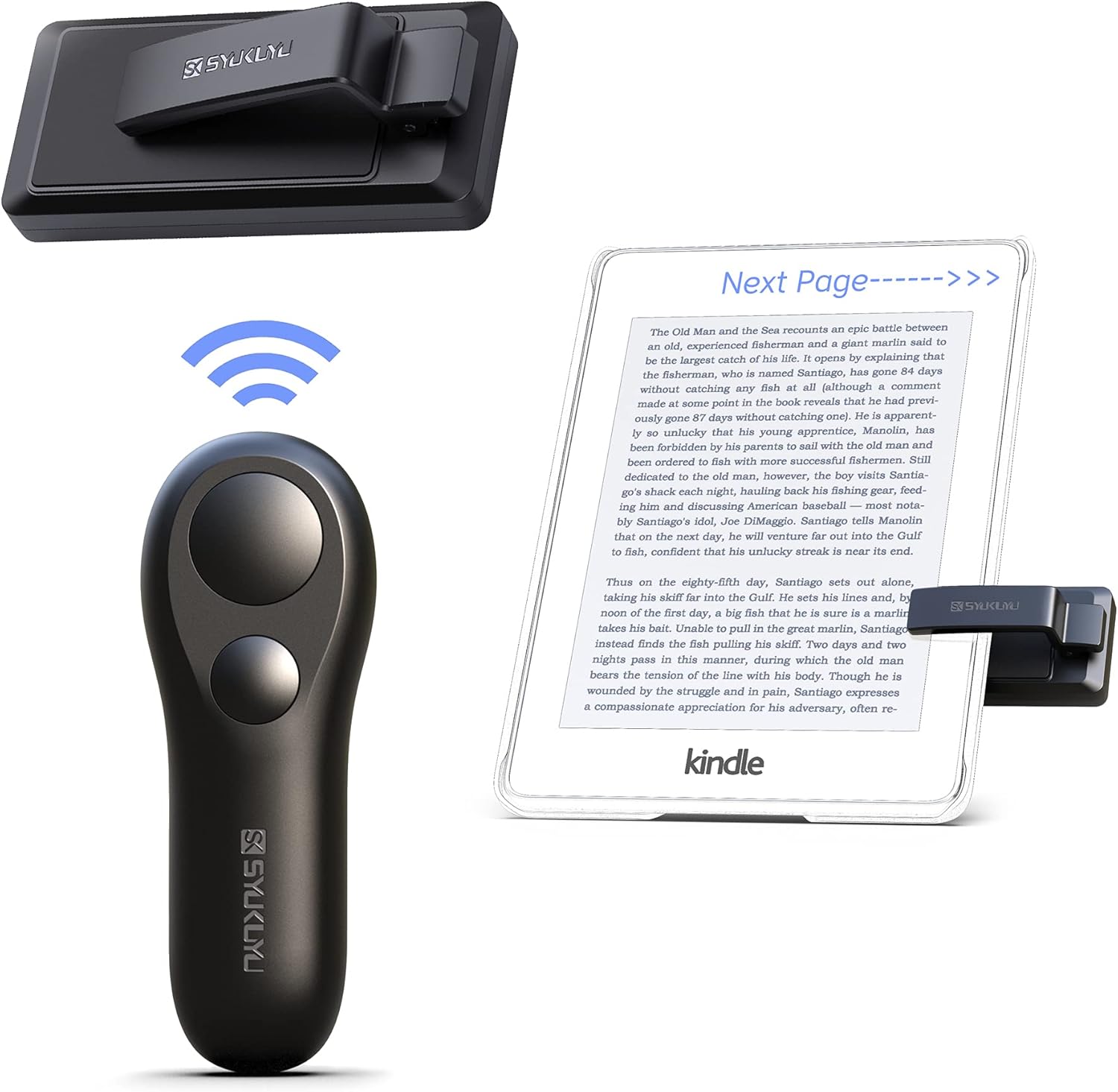
SYUKUYU RF Remote Control Page Turner
Introducing the SYUKUYU RF Remote Control Page Turner, a versatile accessory that enhances your reading experience on multiple platforms. Whether you're using a Kindle, iPhone, iP…
Manual and instructions
Instruction-focused content generated from the current product data and source context.
SYUKUYU RF Remote Control Page Turner User Manual
Product Overview
The SYUKUYU RF Remote Control Page Turner is a versatile device designed to enhance your reading experience on various platforms such as Kindle, iPhone, iPad, and Android tablets. It allows hands-free page-turning for a more comfortable and convenient reading session.
Getting Started
- Charge the device using the provided USB cable. A full charge can last several weeks on standby.
- Clip the page turner onto your device ensuring that the touchpad is in contact with the screen.
- Turn on the page turner by holding the power button until the LED indicator lights up.
- Use the remote control to turn pages. The remote has two buttons which both can be used to turn pages forward when the device is placed on the right side of the screen. To turn pages backward, place the device on the left side of the screen.
Troubleshooting Tips
Device Not Responding
- Ensure that the device is charged and the LED indicator is on.
- Check if the page turner is correctly clipped onto the device with the touchpad in contact with the screen.
Remote Not Turning Pages
- Make sure that the page turner is turned on and the LED indicator is lit.
- Confirm that the remote control is within the operational range of the page turner.
- If the device is on the correct side of the screen for the desired page-turning direction.
Device Breaks or Clip Comes Apart
- Handle the clip with care to avoid breaking it at the bend.
- If the clip breaks, contact the manufacturer for support or consider purchasing a replacement.
Frequently Asked Questions (FAQ)
Can this page turner be used with a case on my device?
Yes, the page turner can be used with a case, but ensure that the touchpad has direct contact with the screen. Some cases may require modification to fit properly.
Does the page turner support Bluetooth technology?
No, this page turner does not support Bluetooth technology. It operates using RF signals.
How do I know when the battery is low?
Currently, there is no low battery indicator. It is recommended to charge the device regularly to ensure it is always ready for use.
Can I turn pages backward with this device?
Yes, you can turn pages backward by placing the device on the left side of the screen and pressing the button on the remote control.
Is there a difference between the two buttons on the remote?
Both buttons perform the same function of turning pages forward when the device is placed on the right side of the screen. However, one button is designed to be quieter for night reading.
How often does the device need to be charged?
The device holds a charge for several weeks on standby. Charge frequency will depend on usage.
Frequently asked questions
Q: What devices is the SYUKUYU RF Remote Control Page Turner compatible with?
A: The SYUKUYU RF Remote Control Page Turner is compatible with multiple platforms, including Kindle, iPhone, iPad, Android tablets, and other devices that support e-book reading.
Q: How does the remote control make reading more convenient?
A: The remote control allows you to release your hands while reading, providing a more comfortable and free reading experience.
Q: Is the remote control easy to use?
A: Yes, the remote control is designed to be clipped onto the device when in use and easily taken off when not needed. It can be controlled with one hand and has a compact and delicate design for a comfortable feel.
Q: How is the remote control powered?
A: The remote control can be charged via USB, eliminating the need for changing batteries. With a single charge, it can standby for a few weeks.
Q: Does the remote control have a mute button?
A: Yes, the remote control is designed with a mute button. This feature allows for noise-free reading in quiet environments, such as during nighttime reading.
Q: What are the dimensions and weight of the remote control?
A: The SYUKUYU RF Remote Control Page Turner has dimensions of 3.43 x 1.26 x 0.87 inches and weighs 3.53 ounces (100 grams).
Q: What is the model number of the remote control?
A: The model number of the SYUKUYU RF Remote Control Page Turner is SKPT01.
Q: Is Bluetooth technology supported by this remote control?
A: No, this remote control does not support Bluetooth technology.
Q: What color is the remote control available in?
A: The remote control is available in black.
Q: Is this product compatible with all tablet devices?
A: Yes, this product is compatible with tablet devices.
Q: What is the Best Sellers Rank of this product?
A: The SYUKUYU RF Remote Control Page Turner currently holds the #39 rank in Tablet Accessories.
Q: When was this product first available?
A: This product was first available on January 17, 2021.
Q: What is the country of origin for this product?
A: This product is manufactured in China.
Q: Are batteries required for this remote control?
A: Yes, this remote control requires 2 Lithium Polymer batteries.
Q: What is the average customer rating for this product?
A: The average customer rating for the SYUKUYU RF Remote Control Page Turner is 4.4 out of 5 stars, based on 3,773 ratings.
Q: Is there a video review available for this product?
A: Yes, there are video reviews available that demonstrate how to use and benefit from the SYUKUYU RF Remote Control Page Turner.
Specifications
Structured product details pulled from the latest available product data.
| Brand | SK SYUKUYU |
|---|---|
| Manufacturer | SK SYUKUYU |
| Model Number | SKPT01 |
| Category | Electronics > eBook Readers & Accessories |
| Color | Black |
| Weight | 3.53 ounces |
| Dimensions | 3.43 x 1.26 x 0.87 inches |
| First Available | January 17, 2021 |
| Product Dimensions | 3.43 x 1.26 x 0.87 inches |
| Item Weight | 3.53 ounces |
| ASIN | B08T8CZYF3 |
| Item model number | SKPT01 |
| Batteries | 2 Lithium Polymer batteries required. (included) |
| Customer Reviews | 4.4 4.4 out of 5 stars 12,207 ratings 4.4 out of 5 stars |
| Best Sellers Rank | #3,436 in Electronics (See Top 100 in Electronics) #70 in eBook Readers & Accessories |
| Date First Available | January 17, 2021 |
| Special Feature | One-handed operation, USB charging, Mute button |
| Max Number of Supported Devices | 1 |
| Compatible Devices | Kindle, iPhone, iPad, Android tablets |
Use this page carefully
ProductReviewGPT pages are AI-assisted summaries. When a source document is available, it should take priority over the generated summary for important operating, warranty, safety, or compliance details.