
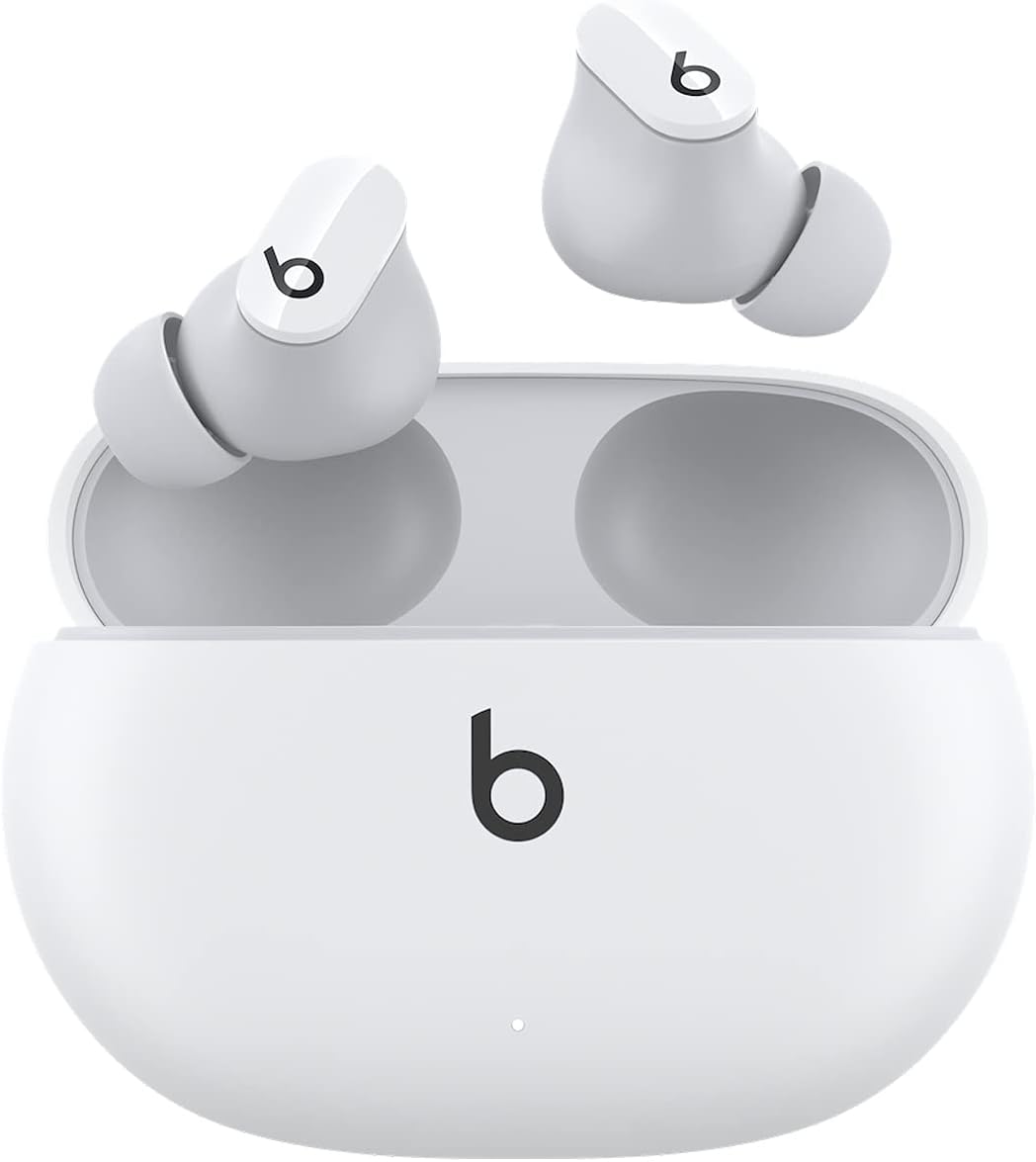
Beats Studio Buds - True Wireless Earbuds (White)
Introducing the Beats Studio Buds, the ultimate true wireless noise-canceling earbuds that deliver an immersive audio experience. Whether you're an Apple or Android user, these ea…
Manual and instructions
Instruction-focused content generated from the current product data and source context.
Beats Studio Buds User Manual
Getting Started
- Inside the box, you will find your Beats Studio Buds, a charging case, eartips in three sizes, a USB-C to USB-C charging cable, a Quick Start Guide, and a Warranty card. Please note that a USB-C power adapter is sold separately.
- Choose the eartip size that provides the best fit and acoustic seal for your ears for optimal audio quality and comfort.
- To power on your Beats Studio Buds, simply remove them from the charging case. They will automatically enter pairing mode the first time they are powered on.
- Connect your Beats Studio Buds to your device via Bluetooth. On your device, navigate to the Bluetooth settings and select 'Beats Studio Buds' from the list of available devices.
- Once paired, you can enjoy up to 8 hours of listening time, or up to 24 hours with the additional charges provided by the charging case.
Using Your Beats Studio Buds
- To play or pause audio, press once on the b button on either earbud.
- To skip tracks, double-press the b button on either earbud.
- To control calls, press once on the b button to answer or end a call. Press and hold the b button to reject a call.
- Activate Active Noise Cancelling (ANC) or Transparency mode by pressing and holding the b button on either earbud.
- To charge your Beats Studio Buds, place them back into the charging case. Connect the case to a power source using the included USB-C cable.
Troubleshooting Tips
- Earbuds Not Pairing:
- - Ensure Bluetooth is enabled on your device and the earbuds are in pairing mode.
- - Reset your Beats Studio Buds by placing them in the case and holding the system button until the LED indicator flashes.
- Audio Quality Issues:
- - Check that the eartips are the correct size and are properly attached to create a tight seal.
- - Ensure there is no debris on the earbuds or in the eartip that could interfere with sound quality.
- Earbuds Not Charging:
- - Verify that the charging case has charge or is connected to a power source.
- - Ensure the earbuds are correctly seated in the case and the charging contacts are clean.
Frequently Asked Questions (FAQs)
- Are the Beats Studio Buds compatible with my device?
- Yes, the Beats wireless headphones and earphones are compatible with both Apple and Android devices.
- What is the IPX4 rating?
- The IPX4 rating indicates that the earbuds are sweat and water resistant, making them suitable for exercise and light rain, but they should not be submerged in water.
- How do I activate the Active Noise Cancelling (ANC) feature?
- To activate ANC, press and hold the b button on either earbud. You will hear a chime indicating that ANC is activated.
- How long is the battery life?
- The Beats Studio Buds offer up to 8 hours of listening time on a single charge, with an additional 16 hours provided by the charging case for a total of 24 hours of combined playback.
- Can I use the earbuds for phone calls?
- Yes, the Beats Studio Buds feature high-quality call performance and built-in microphones for voice calls and voice assistant interaction.
For further assistance, consult the Quick Start Guide included with your Beats Studio Buds or contact Beats customer support.
Frequently asked questions
Q: What is included in the box when purchasing Beats Studio Buds?
A: The box includes Beats Studio Buds True Wireless Noise Cancelling Earphones, a charging case, eartips with three size options, a USB-C to USB-C charging cable, Quick Start Guide, and Warranty card. Please note that the USB-C power adapter is sold separately.
Q: What are the available listening modes for Beats Studio Buds?
A: Beats Studio Buds offer two distinct listening modes: Active Noise Cancelling (ANC) and Transparency mode. You can control your sound and choose between these two modes.
Q: How long is the battery life of Beats Studio Buds?
A: The earbuds provide up to 8 hours of listening time. However, when combined with the pocket-sized charging case, the total listening time can reach up to 24 hours.
Q: Are Beats Studio Buds compatible with both Apple and Android devices?
A: Yes, Beats Studio Buds are compatible with both Apple and Android devices. You can use them with a wide range of smartphones and other devices.
Q: Are the Beats Studio Buds sweat and water-resistant?
A: Yes, the Beats Studio Buds have an IPX4 rating, which means they are sweat and water-resistant. This makes them suitable for workouts and other activities where you may perspire.
Q: What type of Bluetooth technology do the Beats Studio Buds use?
A: The Beats Studio Buds feature industry-leading Class 1 Bluetooth technology. This provides an extended range and fewer dropouts for a more stable wireless connection.
Q: Can I make phone calls and interact with voice assistants using the Beats Studio Buds?
A: Yes, the built-in microphones on the Beats Studio Buds ensure high-quality call performance. Additionally, you can interact with voice assistants on your device using these earbuds.
Q: What are the dimensions and weight of the Beats Studio Buds?
A: The dimensions of the Beats Studio Buds are approximately 2.83 x 2.01 x 1 inches, and they weigh around 4.16 ounces.
Q: When were the Beats Studio Buds first available for purchase?
A: The Beats Studio Buds became available for purchase on June 14, 2021.
Q: Where are the Beats Studio Buds manufactured?
A: The Beats Studio Buds are manufactured in China.
Q: What is the model number of the Beats Studio Buds?
A: The model number of the Beats Studio Buds is MJ4Y3LL/A.
Source documents
Official manuals and related source files discovered for this product.

Specifications
Structured product details pulled from the latest available product data.
| Brand | Beats |
|---|---|
| Manufacturer | Beats |
| Model Number | MJ4Y3LL/A |
| Color | White |
| Material | Plastic or Polycarbonate |
| Weight | 4.2 ounces |
| Dimensions | 2.83 x 2.01 x 1 inches |
| First Available | June 14, 2021 |
| Headphones Jack | USB |
| Model Name | Beats Studio Buds |
| Connectivity Technology | Wireless |
| Wireless Communication Technology | Bluetooth, True Wireless |
| Included Components | Eartip, Wireless Charging Case, Cable, User Manual, Warranty Card, Wireless Earbuds |
| Age Range (Description) | Adult, Teen |
| Material | Plastic |
| Specific Uses For Product | Entertainment, Fitness, Travel |
| Charging Time | 8 Hours |
| Recommended Uses For Product | Calling, Cycling, Exercising, Gaming, Office Meetings |
| Compatible Devices | Cellphones, Desktops, Gaming Consoles, Laptops, Tablets |
| Control Type | Media Control, Volume Control, Voice Control, Call Control, Noise Control |
| Cable Feature | Without Cable |
| Water Resistance Level | Water Resistant |
| Frequency Range | 20 hertz - 20 KHz |
| Unit Count | 1.0 Count |
| Style | Studio Buds |
| Control Method | App, Touch, Voice |
| Number of Items | 1 |
| Controller Type | Button, Siri, Touch |
| Battery Life | 8 Hours |
| Audio Driver Type | Dynamic Driver |
| Bluetooth Range | 100 Meters |
| Carrying Case Battery Average Life | 24 Hours |
| Carrying Case Weight | 90 Grams |
| Carrying Case Material | Plastic or Polycarbonate |
| Carrying Case Color | White |
| Earpiece Shape | Rounded Tip |
| Is Autographed | No |
| UPC | 194252388396 |
| Special Feature | Noise Cancellation |
| Global Trade Identification Number | 30194252388397 |
| Product Dimensions | 2.83 x 2.01 x 1 inches |
| Item Weight | 4.2 ounces |
| Department | Unisex-Adult |
| ASIN | B096SRYXMP |
| Item model number | MJ4Y3LL/A |
| Batteries | 3 Lithium Ion batteries required. (included) |
| Date First Available | June 14, 2021 |
| Color | White |
| Ear Placement | In Ear |
| Form Factor | In Ear, True Wireless |
| Noise Control | Active Noise Cancellation, Sound Isolation |
| Weight | Studio Buds (each): 5g, Case: 48g, Total: 58g |
| Dimensions | Length: (case) 7.2cm / 2.83in (bud) 2.05cm / 0.81in, Width: (case) 5.1cm / 2in (bud) 1.85cm / 0.73in, Height: (case) 2.55cm / 1in (bud) 1.5cm / 0.59in |
| Power and Battery | Beats Studio Buds (single charge): up to 8 hours of listening time. Fast Fuel: a 5-minute charge provides up to 1 hour of playback. |
| Release Date | 6/25/2021 |
Use this page carefully
ProductReviewGPT pages are AI-assisted summaries. When a source document is available, it should take priority over the generated summary for important operating, warranty, safety, or compliance details.