
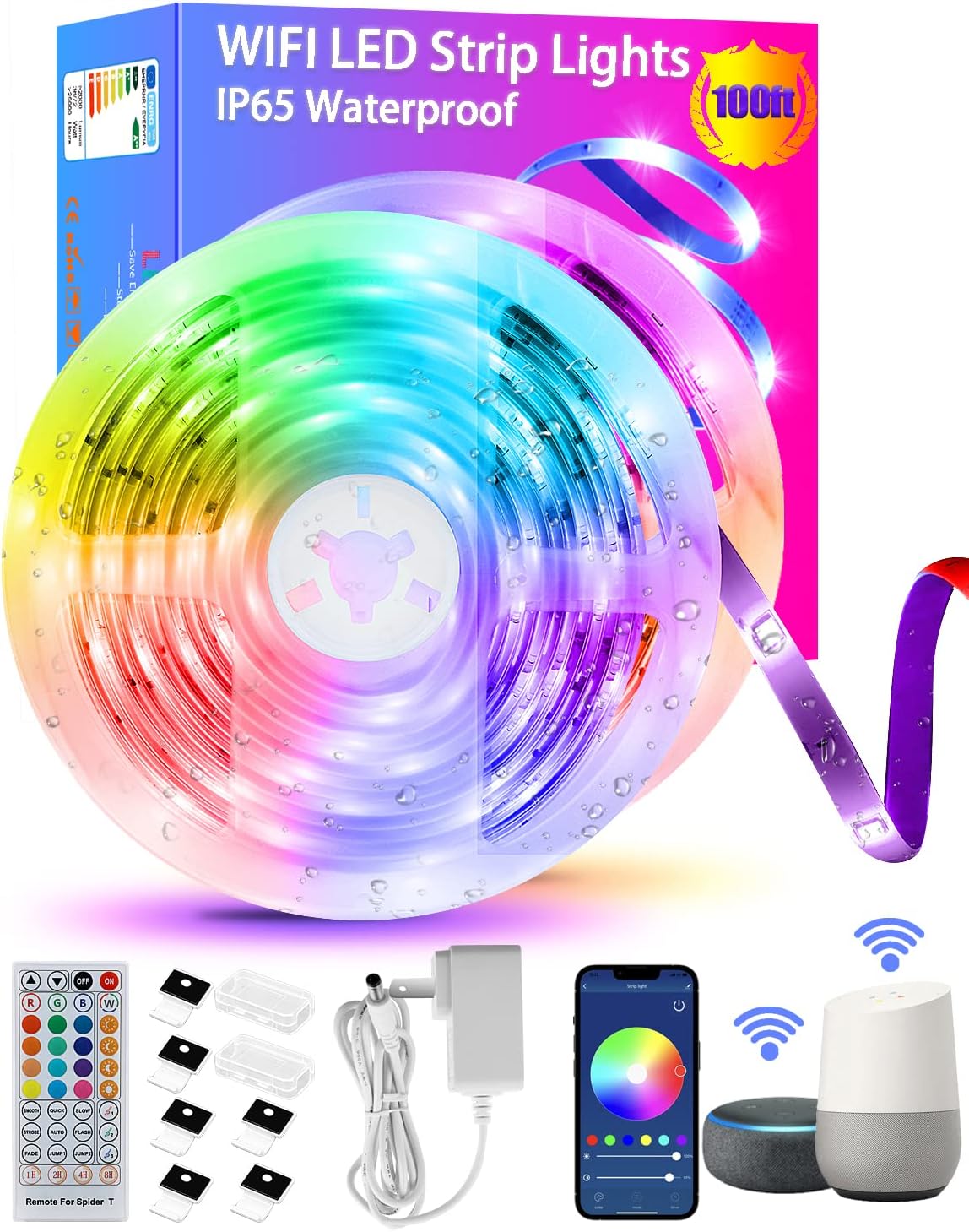
TENDIST 100ft WiFi LED Strip Lights - RGB Waterproof
The TENDIST 100ft Led Strip Lights are a fantastic addition to any home or outdoor space. These LED strip lights are waterproof, making them perfect for outdoor use, and they are…
Manual and instructions
Instruction-focused content generated from the current product data and source context.
TENDIST 100ft LED Strip Lights User Manual
Package Contents
- 2 x 50ft LED Strip Lights
- 1 x WiFi Controller
- 1 x Power Adapter
- 1 x 40-Button IR Remote Control
- 1 x User Manual
- Securing Clips
Installation
- Ensure the surface where you plan to install the LED strip lights is clean, dry, and smooth.
- Peel off the protective film from the self-adhesive backing of the LED strip lights.
- Stick the LED strip lights onto the surface, applying even pressure along the entire length to ensure proper adhesion. Avoid bending or twisting the strip to prevent damage.
- Use the included securing clips to further secure the LED strip lights in place, if necessary.
- Connect the LED strip lights to the WiFi controller and power adapter.
- Plug the power adapter into a power outlet.
WiFi Setup and App Control
- Download the Tuya Smart app from the App Store (iOS) or Google Play Store (Android).
- Create an account and sign in to the app.
- Ensure your smartphone is connected to a 2.4GHz Wi-Fi network.
- Turn on the LED strip lights and press the "+" button in the app to add a new device.
- Select "Lighting Devices" and follow the on-screen instructions to complete the setup process.
- Once connected, you can control the LED strip lights using the app, including color selection, brightness adjustment, and timer settings.
Voice Control with Amazon Alexa and Google Assistant
- Ensure the LED strip lights are connected to your Tuya Smart app.
- Open the Amazon Alexa or Google Home app on your smartphone.
- Link your Tuya Smart account with the respective voice assistant app.
- Once linked, you can use voice commands to control the LED strip lights, including turning on/off, changing colors, and adjusting brightness.
Using the 40-Button IR Remote Control
- Point the remote control at the WiFi controller to ensure proper reception of the IR signal.
- Use the color buttons to select a specific color for the LED strip lights.
- Use the brightness buttons to adjust the brightness of the LED strip lights.
- Use the mode buttons to select different lighting effects, such as fade or blink.
- Press the power button to turn the LED strip lights on or off.
Troubleshooting Tips
- If the LED strip lights are not working correctly or displaying incorrect colors, check the connections between the LED strip lights, WiFi controller, and power adapter. Ensure all connections are secure and properly aligned.
- If the LED strip lights are not responding to the app or voice commands, ensure your smartphone is connected to a 2.4GHz Wi-Fi network and the LED strip lights are connected to the Tuya Smart app. Try restarting the app and reconnecting the LED strip lights if necessary.
- If the LED strip lights are not responding to the remote control, ensure the remote control is pointed at the WiFi controller and within 20 feet of the controller. Check the batteries in the remote control and replace them if necessary.
Frequently Asked Questions
Can I connect the two 50ft LED strip lights into one 100ft strip?
No, the two 50ft LED strip lights are designed to be used separately and cannot be combined into a single 100ft strip. If you need a longer strip, consider purchasing a different product that meets your requirements.
Can I cut the LED strip lights to fit a specific length?
Yes, you can cut the LED strip lights at the designated cutting points marked on the strip. However, cutting the strip may affect its waterproof properties and void the warranty. Exercise caution when cutting the strip and ensure you do not damage the LEDs or other components.
Why are my LED strip lights not connecting to Wi-Fi?
Ensure your smartphone is connected to a 2.4GHz Wi-Fi network, as the LED strip lights do not support 5GHz networks. If the issue persists, try restarting your Wi-Fi router and reconnecting the LED strip lights to the Tuya Smart app.
How do I prevent the LED strip lights from falling off the surface?
Ensure the surface where you plan to install the LED strip lights is clean, dry, and smooth before installation. Apply even pressure along the entire length of the strip during installation to ensure proper adhesion. Use the included securing clips to further secure the LED strip lights in place, if necessary.
Frequently asked questions
Q: Is the TENDIST 100ft Led Strip Lights Waterproof?
A: Yes, the LED strip is waterproof with an IP65 rating, making it splashproof, dust-proof, and moisture-proof. However, the adapter and Wi-Fi control box are not waterproof.
Q: Is the TENDIST 100ft Led Strip Lights compatible with Alexa?
A: Yes, the RGB Wi-Fi string light works with Alexa and Google Assistant. You can use your smart device for voice control over the color-changing light.
Q: How long is the TENDIST 100ft Led Strip Lights?
A: The LED strip comes in two 50ft waterproof rolls, making it a total of 100ft long. It is suitable for large areas such as indoor bedrooms, bathrooms, ceilings, living rooms, outdoor patios, pavilions, boats, and yachts.
Q: What are the special features of the TENDIST 100ft Led Strip Lights?
A: The LED strip lights are dimmable, waterproof, voice-controlled via Alexa and Google Assistant, app-controlled, remote-controlled, splashproof, dustproof and moistureproof. It also has a timer to turn on & off strip light automatically. It has 16 million RGB color mix and dynamic scene modes. You can create a DIY color scene by Tuya smart.
Q: Can I cut the TENDIST 100ft Led Strip Lights to length?
A: Yes, you can cut the LED strip to your desired length.
Q: How wide is the TENDIST 100ft Led Strip Lights?
A: The width of the strip light is 10mm.
Q: Is there a fee to use the app to control lights?
A: No, the app is free and will control many different lights.
Q: What should I do if some of my lights are not working correctly?
A: If you experience any issues with the lights, you can contact the seller's customer support for assistance.
Q: Can I add additional 50ft strips to make it longer than 100ft?
A: No, the two 50ft LED strips cannot be connected together. They must be connected to the controller to make a whole strand. If you need extra length, please contact the seller's customer support.
Q: Can I directly wire the TENDIST 100ft Led Strip Lights to the 12v wiring on a camper or 12v light?
A: The controller input is 12V, and both strip lights need to be connected to the controller.
Q: What is included in the TENDIST 100ft Led Strip Lights set?
A: The set includes two 50ft waterproof LED strip rolls, a Wi-Fi control box, an adapter, and a remote control.
Overall, the TENDIST 100ft Led Strip Lights are a great product for indoor and outdoor lighting decoration. It has various special features such as being waterproof, voice-controlled via Alexa and Google Assistant, app-controlled, remote-controlled, and dimmable. The LED strip lights are easy to install and come with a responsive after-sales service.
Specifications
Structured product details pulled from the latest available product data.
| Brand | TENDIST |
|---|---|
| Category | Tools & Home Improvement > Lighting & Ceiling Fans > Novelty Lighting > LED Strip Lights |
| Color | RGB |
| Color | RGB-WiFi |
| Indoor/Outdoor Usage | Outdoor, Indoor |
| Special Feature | Dimmable, Waterproof, Voice Control via Alexa and Google Assistant, App Control, Remote Controlled, Splashproof, Dustproof and Moistureproof, Easy to Install, Timer See more |
| Light Source Type | LED |
| Power Source | Corded Electric |
| Light Color | RGB |
| Theme | Colorful Fairy Lighting |
| Occasion | Christmas, Anniversary, Halloween |
| Style | Modern |
Use this page carefully
ProductReviewGPT pages are AI-assisted summaries. When a source document is available, it should take priority over the generated summary for important operating, warranty, safety, or compliance details.