
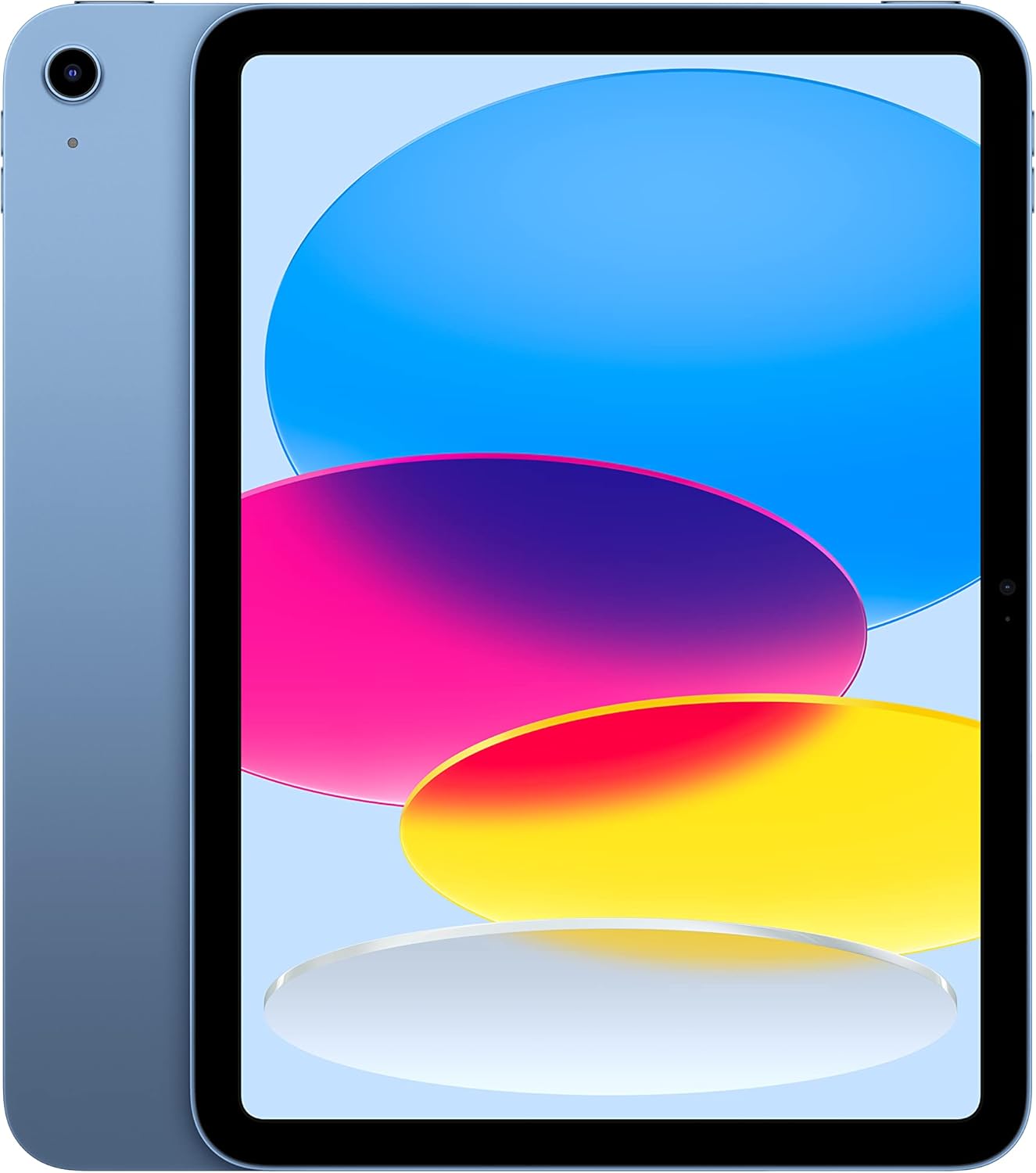
Apple iPad (10th Gen) - A14 Bionic, 10.9" Retina Display, 64GB, WiFi, Blue
The Apple iPad (10th Generation) is a versatile and powerful tablet that is perfect for your everyday needs. With its all-screen design and 10.9-inch Liquid Retina display, you ca…
Manual and instructions
Instruction-focused content generated from the current product data and source context.
User Manual for Apple iPad (10th Generation)
Getting Started
- Unboxing: Carefully open the box and remove the iPad, USB-C Charge Cable (1 meter), and the 20W USB-C Power Adapter.
- Power On: Press and hold the top button until the Apple logo appears. If the iPad doesn't turn on, connect it to the power adapter and charge it using the included USB-C cable.
- Initial Setup: Follow the on-screen instructions to set up your iPad. This will include connecting to Wi-Fi, signing in with or creating an Apple ID, and setting up Touch ID.
- Transfer Data: If upgrading from an older iPad or moving from an Android device, you can transfer your data during the initial setup using Quick Start or the Move to iOS app, respectively.
Basic Operations
- Navigation: Use simple gestures to navigate your iPad. Tap to select items, swipe to scroll, and pinch to zoom in or out.
- Using Apps: Tap an app to open it. Swipe up from the bottom of the screen to return to the Home screen or switch between apps.
- Apple Pencil: Connect your Apple Pencil (1st generation) using the USB-C to Apple Pencil Adapter (sold separately) for drawing or taking notes.
- Touch ID: Use your fingerprint to unlock your iPad, authenticate purchases, or sign in to apps. Set up Touch ID in the iPad's settings.
Connectivity
- Wi-Fi: Connect to a Wi-Fi network through the Settings app to access the internet and download apps.
- Bluetooth: Pair devices such as keyboards and headphones via Bluetooth in the Settings app.
- USB-C: Use the USB-C port to charge your iPad, connect to computers, or use compatible accessories.
Cameras and Multimedia
- Front Camera: Use the 12MP Ultra Wide front camera with Center Stage for video calls and selfies.
- Rear Camera: Capture photos and 4K videos with the 12MP Wide back camera. Edit your media directly on the iPad.
- Media Consumption: Enjoy music, movies, and games with the immersive 10.9-inch Liquid Retina display and stereo speakers.
Troubleshooting Tips
- If your iPad won't turn on, ensure it's charged and try a forced restart by pressing and holding both the top button and the volume up or down button until the Apple logo appears.
- If you're experiencing Wi-Fi connectivity issues, go to Settings > Wi-Fi and make sure Wi-Fi is turned on. Forget the network and reconnect, or try resetting network settings.
- For unresponsive touch screen issues, clean the screen with a soft, slightly damp, lint-free cloth. Restart your iPad if necessary.
- If apps are crashing or not working correctly, try updating the app or iPadOS via the App Store or Settings app, respectively.
- When facing issues with charging, check the USB-C port for debris, use a different cable or power adapter, or try a different power outlet.
FAQs
How do I set up Touch ID?
Go to Settings > Touch ID & Passcode, and follow the on-screen instructions to add your fingerprint.
Can I use an Apple Pencil with this iPad?
Yes, the iPad is compatible with the Apple Pencil (1st generation), which can be connected using a USB-C to Apple Pencil Adapter (sold separately).
What is the battery life of the iPad?
The iPad offers up to 10 hours of surfing the web on Wi-Fi or watching video. Battery life may vary depending on usage.
How can I transfer data from my old iPad?
Use the Quick Start feature by bringing the two devices close together during setup, or use the Move to iOS app for transferring data from an Android device.
Does this iPad have a headphone jack?
No, this iPad does not have a headphone jack. You can use wireless Bluetooth headphones or USB-C wired headphones.
Can I use this iPad for video editing?
Yes, the A14 Bionic chip provides powerful performance suitable for video editing, and you can use apps like iMovie or Adobe Premiere Rush for editing on the iPad.
How do I charge the iPad?
Use the included USB-C cable and 20W power adapter to charge your iPad. Connect the USB-C cable to the iPad and the power adapter, then plug the adapter into a power outlet.
What should I do if my iPad is not charging?
Ensure the charging cable and adapter are correctly connected, inspect the USB-C port for debris, and try a different power outlet or cable. If the problem persists, contact Apple Support.
Frequently asked questions
Q: What are the main features of the Apple iPad (10th Generation)?
A: The Apple iPad (10th Generation) comes with a powerful A14 Bionic chip, a 10.9-inch Liquid Retina Display with True Tone, and a 12MP front and back camera. It also has Touch ID for secure unlocking and payments, fast Wi-Fi 6 connectivity, and all-day battery life.
Q: What is the storage capacity of the iPad (10th Generation)?
A: The iPad (10th Generation) is available in two storage options: 64GB and 256GB.
Q: Can I use the Apple Pencil with this iPad?
A: Yes, you can use the Apple Pencil (1st generation) with the iPad (10th Generation). However, the Apple Pencil is sold separately, and you will need a USB-C to Apple Pencil Adapter to connect it.
Q: What is the screen size and resolution of the iPad (10th Generation)?
A: The iPad (10th Generation) has a 10.9-inch Liquid Retina display with a maximum resolution of 2360 x 1640 pixels.
Q: How long does the battery last on the iPad (10th Generation)?
A: The iPad (10th Generation) has a battery life of up to 10 hours of surfing the web on Wi-Fi or watching video. It can be charged via USB-C to a computer system or power adapter.
Q: Does the iPad (10th Generation) come with any accessories?
A: The iPad (10th Generation) comes with a USB-C Charge Cable (1 meter) and a 20W USB-C Power Adapter. However, accessories like the Apple Pencil and Magic Keyboard Folio are sold separately.
Q: What is the weight and dimensions of the iPad (10th Generation)?
A: The Wi-Fi model of the iPad (10th Generation) weighs 1.05 pounds (477 grams), and the Wi-Fi + Cellular model weighs 1.06 pounds (481 grams). The dimensions are 9.79 inches (248.6 mm) in height, 7.07 inches (179.5 mm) in width, and 0.28 inch (7 mm) in depth.
Q: Does the iPad (10th Generation) support Wi-Fi 6?
A: Yes, the iPad (10th Generation) supports Wi-Fi 6, which provides fast access to files, uploads, and downloads, as well as seamless streaming of shows.
Q: What is the camera quality of the iPad (10th Generation)?
A: The iPad (10th Generation) features a 12MP Wide camera with Smart HDR 3 and 4K video capabilities at various frame rates. It also has a landscape 12MP Ultra Wide front camera with Center Stage for videoconferencing and selfies.
Q: What operating system does the iPad (10th Generation) run on?
A: The iPad (10th Generation) runs on iPadOS, which is designed to be more productive, intuitive, and versatile. It allows you to run multiple apps at once, use Apple Pencil for writing with Scribble, and edit and share photos.
Q: Are there any color options for the iPad (10th Generation)?
A: Yes, the iPad (10th Generation) comes in four gorgeous colors: Blue, Silver, Space Gray, and Rose Gold.
Specifications
Structured product details pulled from the latest available product data.
| Brand | Apple |
|---|---|
| Manufacturer | Apple |
| Model Number | MPQ13LL/A |
| Weight | 1.05 pounds |
| Dimensions | 0.28 x 7.07 x 9.79 inches |
| First Available | October 18, 2022 |
| Product Dimensions | 0.28 x 7.07 x 9.79 inches |
| Item Weight | 1.05 pounds |
| ASIN | B0BJLXMVMV |
| Item model number | MPQ13LL/A |
| Batteries | 1 Lithium Ion batteries required. (included) |
| Date First Available | October 18, 2022 |
| Model Name | iPad |
| Memory Storage Capacity | 64 GB |
| Screen Size | 10.9 Inches |
| Display Resolution Maximum | 2360 x 1640 Pixels |
| Display | 10.9-inch Liquid Retina display with True Tone |
| Capacity | 64GB, 256GB |
| Chip | A14 Bionic chip, 6-core CPU, 4-core graphics, 16-core Neural Engine |
| Camera and Video | 12MP Wide camera with Smart HDR 3 and 4K video at 24 fps, 25 fps, 30 fps, or 60 fps |
| Front Camera | Landscape 12MP Ultra Wide front camera with Center Stage and Smart HDR 3 |
| Battery Life | Up to 10 hours of surfing the web on Wi‑Fi or watching video, Up to 9 hours of surfing the web using cellular data network, Charging via USB-C to computer system or power adapter |
| Connector | USB-C |
| In the Box | iPad, USB-C Charge Cable (1 meter), 20W USB-C Power Adapter |
| Height | 9.79 inches (248.6 mm) |
| Width | 7.07 inches (179.5 mm) |
| Depth | 0.28 inch (7 mm) |
| Weight | 1.05 pounds (477 grams) Wi-Fi model; 1.06 pounds (481 grams) Wi-Fi + Cellular model |
| Apple Pencil | Works with Apple Pencil (1st generation) using USB-C to Apple Pencil Adapter - sold separately |
Use this page carefully
ProductReviewGPT pages are AI-assisted summaries. When a source document is available, it should take priority over the generated summary for important operating, warranty, safety, or compliance details.