
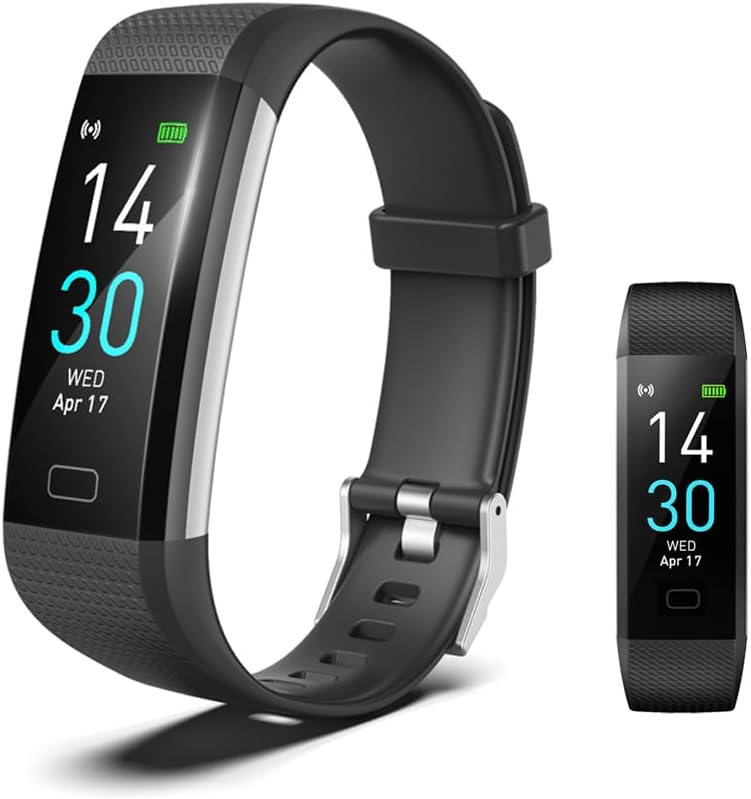
BrilliantHouse Fitness Tracker - Black
The BrilliantHouse Fitness Tracker is a versatile smartwatch that helps you monitor and improve your health and fitness. Compatible with iOS 9.0 and Android 4.4 or above, this act…
Manual and instructions
Instruction-focused content generated from the current product data and source context.
BrilliantHouse Fitness Tracker User Manual
Getting Started
- Charging Your Fitness Tracker: Remove the band on the side of the tracker with the metal piece to reveal the USB plug. Insert it into any USB port. The device will vibrate and display a charging icon to indicate successful connection.
- Turning on Your Tracker: Long press the touch button at the bottom of the screen for 5 seconds. If the device does not turn on, it may need to be charged.
- Installing the Runmefit App: Download the Runmefit app from the App Store or Google Play Store on your smartphone. Ensure your phone's Bluetooth is on and pair your tracker with the app.
- Wearing Your Tracker: Fasten the band around your wrist, ensuring it is snug but comfortable. The tracker should be worn one finger width below the wrist bone.
Features and Usage
- Activity Tracking: Your tracker automatically records steps, distance, and calories burned. To view your data, tap the touch button to cycle through the display options.
- Heart Rate & Health Monitoring: The tracker measures heart rate, blood pressure, blood oxygen, and temperature. Enable automatic measurement in the Runmefit app to view your health data.
- Sleep Monitoring: Wear your tracker to bed to monitor your sleep patterns. The device tracks deep sleep, light sleep, and wake times.
- Notifications: Receive call, calendar, SMS, and SNS notifications directly on your tracker. Enable notification permissions in the Runmefit app.
- Customizing Your Tracker: Change your watch face and explore additional settings within the Runmefit app.
- Waterproof Use: The IP68 rating allows for use in the rain, while washing hands, showering, and swimming in shallow water.
Troubleshooting Tips
- Tracker Won't Turn On: Ensure the tracker is charged. If it still does not turn on, reset the device by placing it on the charger and then trying to turn it on again.
- Bluetooth Connection Issues: If the tracker disconnects from your phone, unbind the device in the Runmefit app and rebind it to restore the connection.
- Notification Issues: Verify that the Runmefit app has the necessary permissions enabled on your phone and that the app is running in the background.
- Inaccurate Step Count: Wear the tracker close to your skin and ensure it is not too loose. The step counter may not count if you walk less than 20 steps in a short period.
Frequently Asked Questions (FAQ)
Q1: How do I charge the BrilliantHouse activity tracker?
A1: Remove one of the straps to reveal the USB plug. Insert it into a USB port. The device will vibrate and a charging icon will appear on the screen.
Q2: How is the date and time set on the tracker?
A2: The date and time are synchronized automatically with your smartphone once connected via Bluetooth and the Runmefit app.
Q3: How can I ensure I receive notifications on my tracker?
A3: Grant the Runmefit app all necessary permissions on your smartphone and keep the app running in the background. For detailed instructions, refer to the video at youtu.be/J3oBwv0NmbQ.
Q4: Is the step count accurate?
A4: The tracker uses a three-axis accelerometer with a standard error rate of about 2%. For best accuracy, wear the tracker close to your skin and ensure it's not too loose.
Q5: What features does the BrilliantHouse fitness tracker offer?
A5: The tracker offers customizable watch faces, health and activity tracking, sleep monitoring, notifications, waterproof capabilities, and more.
Frequently asked questions
Q1. How do I turn on the BrilliantHouse fitness tracker?
A: To turn on the BrilliantHouse fitness tracker, long press the touch button (located on the bottom of the screen) for 5 seconds. If it still cannot be turned on, it may be out of power and needs to be charged.
Q2. How do I charge the BrilliantHouse activity tracker?
A: The BrilliantHouse activity tracker can be charged by removing one side of the watch band with a metal piece and plugging it into any USB port. When starting charging, the watch will vibrate once, and the charging icon will show on the screen.
Q3. How do I set the date and time of the BrilliantHouse fitness tracker smartwatch?
A: The BrilliantHouse fitness tracker will automatically synchronize the time and date with your phone after connection. If the fitness tracker is out of power, there may be an error in the time when you operate it again. After fully charging the battery, please connect your phone again to automatically synchronize the correct time.
Q4. Why is the notification function not working on my BrilliantHouse fitness tracker?
A: To ensure that the notification function works properly, please follow the reminder in the app during your first connection. Open all the related authorities of the app on your phone and keep the app working in the background even when the screen is closed. You can also watch a video tutorial for clear instructions on how to use this item.
Q5. How accurate is the step count data on the BrilliantHouse fitness tracker?
A: To ensure accurate step count data, wear the watch close to your skin and ensure that there is one finger's distance between the strap and your wrist. The wristband uses a three-axis accelerometer, which may have a deviation error of about 2%. Additionally, if you walk less than 20 steps in a period, the step counter may not count to reduce incorrect counts during activities such as working or sleeping.
Q6. Is the BrilliantHouse fitness tracker waterproof?
A: Yes, the BrilliantHouse fitness tracker has an IP68 waterproof rating, which means it is suitable for running in rain, washing hands, showering, swimming, and diving in shallow water.
Q7. What are the sports modes available on the BrilliantHouse activity tracker?
A: The BrilliantHouse activity tracker offers 17 sports modes for specific activities. These modes can be selected to track your activity throughout the day.
Q8. Can I receive calls and messages on my BrilliantHouse fitness tracker?
A: Yes, the BrilliantHouse fitness tracker can receive call, calendar, SMS, and SNS notifications (from Facebook, WhatsApp, LinkedIn, Instagram, Twitter) on its display. It also has a call reject function.
Q9. Does the BrilliantHouse fitness tracker have a sleep monitoring feature?
A: Yes, the BrilliantHouse activity tracker can monitor your sleep duration and consistency. It provides comprehensive analysis of sleep quality data to help you adjust your sleeping habits for a healthier lifestyle.
Q10. Is the BrilliantHouse fitness tracker compatible with iOS and Android devices?
A: Yes, the BrilliantHouse fitness tracker requires iOS 9.0 or above and Android 4.4 or above. It uses Bluetooth 5.0 for connectivity (only compatible with smartphones, not iPad, PC, or tablet).
Specifications
Structured product details pulled from the latest available product data.
| Brand | BrilliantHouse |
|---|---|
| Manufacturer | BrilliantHouse |
| Model Number | S5 |
| Category | Electronics > Sports & Outdoors > Exercise & Fitness > Fitness Technology > Activity & Fitness Trackers |
| Weight | 23.04 Grams |
| First Available | July 3, 2023 |
| Package Dimensions | 5.59 x 3.39 x 0.75 inches |
| Item Weight | 0.813 ounces |
| ASIN | B0CB1VJMZN |
| Item model number | S5 |
| Batteries | Lithium Ion batteries required. |
| Customer Reviews | 3.6 3.6 out of 5 stars 2,146 ratings 3.6 out of 5 stars |
| Best Sellers Rank | #11,701 in Sports & Outdoors (See Top 100 in Sports & Outdoors) #74 in Activity & Fitness Trackers |
| Date First Available | July 3, 2023 |
| Department | Unisex Adult |
| Item Weight | 23.04 Grams |
| Standing screen display size | 0.96 Inches |
| Operating System | Android 4.4 (or above) / IOS 9.0 (or above) |
| Special Feature | Activity Tracker, Calendaring, Camera, Phone Call, Sedentary Reminder |
| Battery Capacity | 105 Milliamp Hours |
| Connectivity Technology | Bluetooth |
| Wireless Communication Standard | Bluetooth |
| Battery Cell Composition | Lithium |
| GPS | No GPS |
| Shape | Rectangular |
| Screen Size | 0.96 Inches |
Use this page carefully
ProductReviewGPT pages are AI-assisted summaries. When a source document is available, it should take priority over the generated summary for important operating, warranty, safety, or compliance details.